


Cannot right click and close firefox tab on taskbar

I cannot right click and close Firefox tabs on my task bar.
I am able to right click/close other programs and folders. This only occurs with Firefox.
Alle antwurden (8)
By default, if you are closing any window with more than one tab, Firefox will display a warning asking if you want to close all the tabs. This will prevent Firefox from closing until you visit the window with the notice. Can you check and see whether that is the issue? If so, you can turn off that message here if you like:
orange Firefox button or classic Tools menu > Options > Tabs
uncheck Warn me when closing multiple tabs
If that doesn't help, can you see any other dialogs from Firefox that might be the problem?
Closing a Firefox window with multiple tabs is not the issue. From what I have read, right click & close (move, min/maximize) feature on your task bar has been removed with 15.0.1.
Now you must hover your mouse pointer over the tab on your task bar and right click on the popup menu which appears.
Is there a way around this? It is frustrating.
I use a basic theme with no aero-peeking. I get a very similar right-click menu for all icons on the task bar (Firefox and IE8 attached for reference). Can you post a screen shot showing the kind of menu you're expecting?
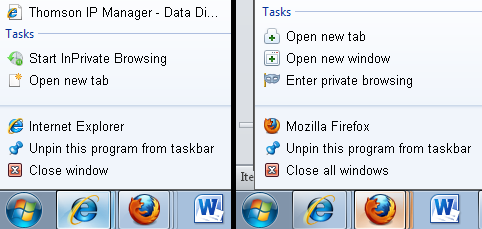
I had this same issue, I fixed it by running firefox in compatibility mode, I chose Vista SP2 but I tried XP SP3 and it worked too. Now my jumplist is back.
Bewurke troch mamercier op
Thanks for the responses. Believe it or not, this sorted itself out. I just opened up FF and am now able to right/close from my task bar.
I appreciate the effort.
Thanks,
Mackniss
I'm still having this problem and it's driving me bonkers. If I right click on my firefox taskbar icon, I get no menu.. meaning I can't close the window, pin/unpin it, etc. Anyone know how to fix this?
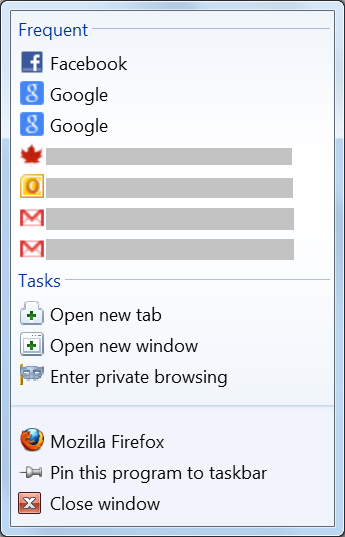
I have the same problem but with FireFox 19.0: Right-clicking Firefox on the taskbar does not produce the expected menu. It produces no menu.
Tested workarounds:
- Running Firefox in compatibility mode for Windows XP (Service Pack 3) allows the advanced right-click menu (i.e., Frequent, Tasks, Pin, Close window).
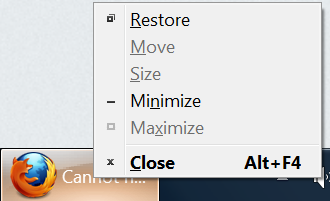
- Mouseover Firefox in the taskbar, and then right-clicking the preview pop-up produces a basic menu (i.e., Restore, Move, ..., Close).
- Shift + right-clicking Firefox on the taskbar produces a basic menu (i.e., Restore, Move, ..., Close).
Bewurke troch F+++ op
The shift-right click works, but why not just give me the menu? Why make the user have to shift click as a regular right-click yields nothing. That's just weird behavior...