Join us to show up for other Firefox users 🦊. Earn fun badges and Mozilla swag vouchers! Find out more: https://mzl.la/askafox150

Windows 10 reached EOS (end of support) on October 14, 2025. If you are on Windows 10, see this article.

Sykje yn Support

Mij stipescams. Wy sille jo nea freegje in telefoannûmer te beljen, der in sms nei ta te stjoeren of persoanlike gegevens te dielen. Meld fertochte aktiviteit mei de opsje ‘Misbrûk melde’.

Mear ynfo

Dizze konversaasje is argivearre. Stel in nije fraach as jo help nedich hawwe.

Firefox does not login at www.kvraudio.com unless private session

  • 3 antwurd
  • 2 hawwe dit probleem
  • 159 werjeftes
  • Lêste antwurd fan RD444
  • Argivearre

You can see that kvr is accepting the password because you would get a reject page if not.

So login is accepted, but not noticed somehow so you stay logged out.

I tried all sorts of setting with cookies and by accident found that private session works.

Look at that autologin cookies are in the system etc.

But it's not just autologin that fails, you never succed in the sense that you get you login id on the page.

But with private session then another set of sites does not work like Cakewalk forum(while in a private session). www.cakewalk.com/forum.

You can see that kvr is accepting the password because you would get a reject page if not. So login is accepted, but not noticed somehow so you stay logged out. I tried all sorts of setting with cookies and by accident found that private session works. Look at that autologin cookies are in the system etc. But it's not just autologin that fails, you never succed in the sense that you get you login id on the page. But with private session then another set of sites does not work like Cakewalk forum(while in a private session). www.cakewalk.com/forum.

Alle antwurden (3)

That sounds that the file cookies.sqlite that stores the cookies is corrupted.

Rename (or delete) cookies.sqlite and cookies.txt, if they exist, in the Profile Folder in case cookies.sqlite got corrupted.

See also http://kb.mozillazine.org/Websites_report_cookies_are_disabled (Other Solutions)

same problem

SOLVED:

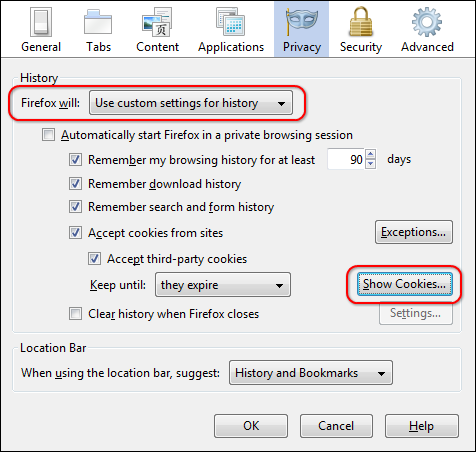
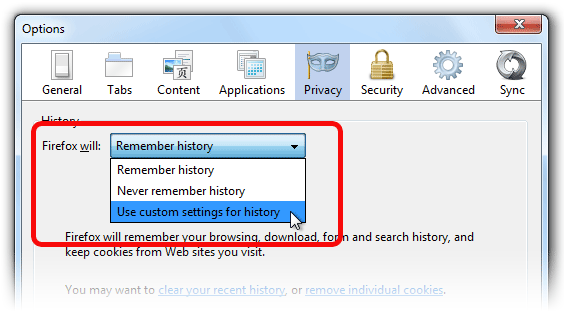
tools - options -privacy

drop down change from 'remeber history' to 'use custom settings' then show cookies and delete kvr cookie folder

login works ok after that
Bewurke troch RD444 op