


Unresponsive script

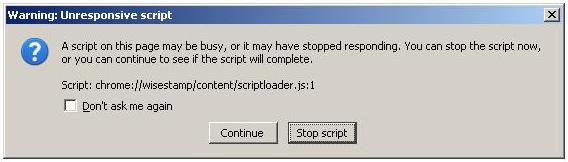
I get an error "Script: file:///C:/Program%20Files/Mozilla%20Firefox/components/nsAddonRepository.js:338" Saying "the script is unresponsive". What does this mean, and how can I fix it?
This happened
Every time Firefox opened
== Months ago.
Alle antwurden (5)
I got this one. file:///C:/Program%20Files/Mozilla%20Firefox/components/nsAddonRepository.js:342
It's usually a different component each time that generates the error.
Same issue with 3.6.7. Please fix/provide a workaround
Can I get any help with this one? Is it WiseStamp's fault? Mozilla's fault? Or caused by a conflict incompatibility issue with another simultaneously running script? or perhaps something else I'm not even thinking of?
Running FF 3.6.1 Win XP SP3, with all of the latest MS updates
Bewurke troch parmoni op
Start Firefox in Use Troubleshoot Mode in Firefox to check if one of your add-ons is causing your problem (switch to the DEFAULT theme: Tools > Add-ons > Themes).
See Troubleshoot extensions, themes and hardware acceleration issues to solve common Firefox problems and Troubleshoot issues with plugins like Flash or Java to fix common Firefox problems
If it does work in Safe-mode then disable all your extensions and then try to find which is causing it by enabling one at a time until the problem reappears.
You can use "Disable all add-ons" on the Safe mode start window to disable all extensions.
You have to close and restart Firefox after each change via "File > Exit" (Mac: "Firefox > Quit"; Linux: "File > Quit")