


Pages show in foreign non-english language

Hello, Im using localized (Lithuanian) version of Firefox. Several updates back, Firefox started including russian and Polish in preferred languages by default. Personally i know how to remove those for myself. However, since im managing around 300 computers in a school. This starts to become an issue. In Lithuania we only have one official language. And when pages in a school start opening in foreign (russian) language this starts to be quite annoying. I would love to keep using Firefox but i need help.
Keazen oplossing
Hi,
To manage this list:
- Click the menu button
 and select Settings.
- In the General panel, go down to Language.
- Click Choose next to Choose your preferred language for displaying pages.
- In the popup:
- Use Add to select more languages
- Use Remove to delete unwanted entries
- Use Move Up / Move Down to change priority
- Click OK.
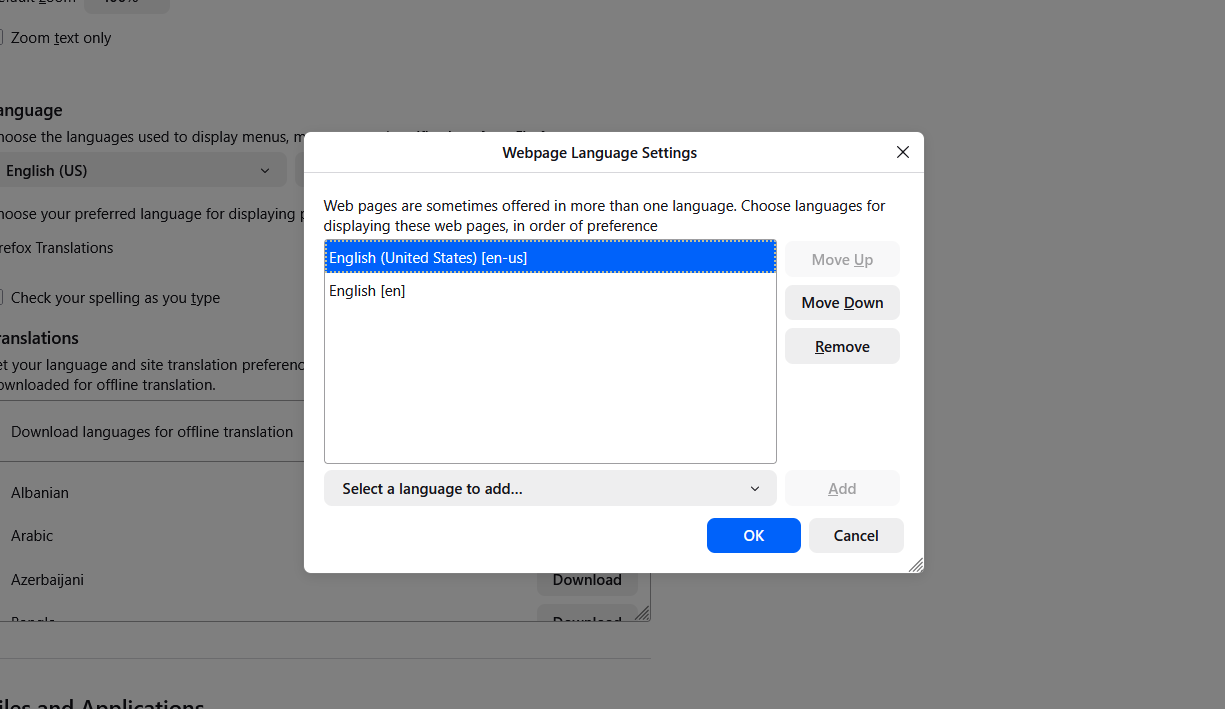
For computers in a domain, you can use the RequestedLocales group policy.
Dit antwurd yn kontekst lêze 👍 1Alle antwurden (3)
Clarification: since Lithuanian is not that popular in the world - all the pages show in russian language by default (even Mozilla itself). Not english. Only old people remember russian.
Bewurke troch lietuv1s op
Keazen oplossing
Hi,
To manage this list:
- Click the menu button and select Settings.
- In the General panel, go down to Language.
- Click Choose next to Choose your preferred language for displaying pages.
- In the popup:
- Use Add to select more languages
- Use Remove to delete unwanted entries
- Use Move Up / Move Down to change priority
- Click OK.
For computers in a domain, you can use the RequestedLocales group policy.
Should I report a bug about default language set for LT, what do you think?
russian is an obvious choice for removal, but still there's about 100k russian babushkas in Lithuania.
Bewurke troch TyDraniu op