


Windows 10 reached EOS (end of support) on October 14, 2025. If you are on Windows 10, see this article.

Sykje yn Support

Mij stipescams. Wy sille jo nea freegje in telefoannûmer te beljen, der in sms nei ta te stjoeren of persoanlike gegevens te dielen. Meld fertochte aktiviteit mei de opsje ‘Misbrûk melde’.

Mear ynfo
Open

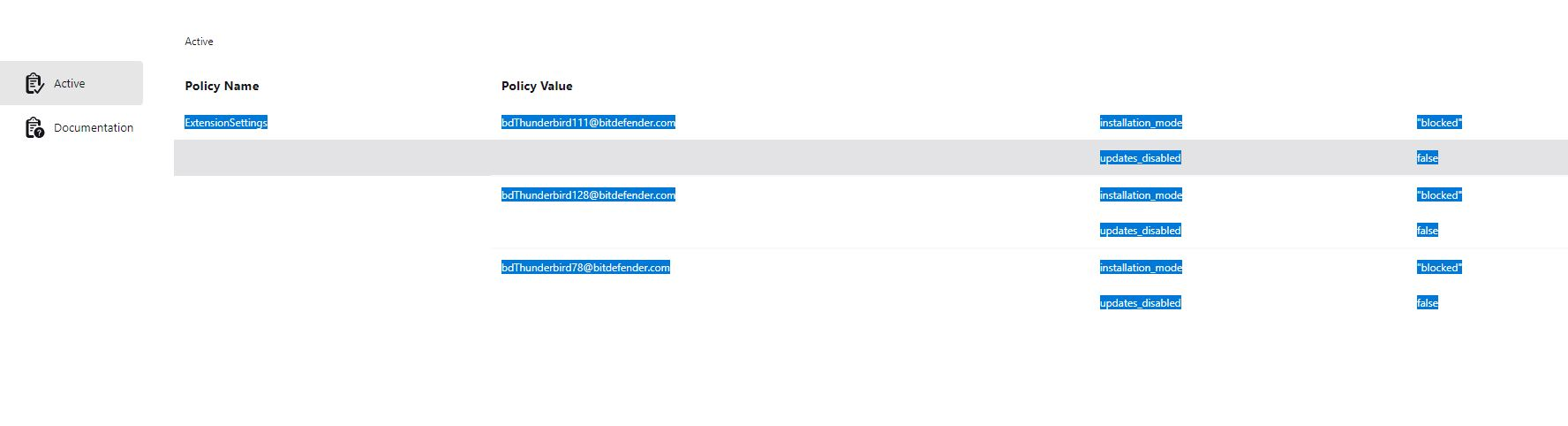
(Revisted) Thunderbird is being managed by your organisation CAUSE: Bitdefender

Ed beäntwurde
flexible

This is a continuation of the thread - [is being managed by your organisation CAUSE: Bitdefender]

The solution of deleting the Registry Key does not work. It simply comes back after reboot. I have engaged with BitDefender support and they suggested the same thing - they also added to uninstall TB which I am not going to do.

The issue is that the BitDefender extension is not installed in a normal way, and cannot be removed. The settings in BitDefender do not make any difference, I cannot change settings in a Thunderbird account eg change a folder location, it looks like it works, but it actually does not.

I did find in the about:config extensions.webextensions.uuids key has the bdThunderbird@bitdefender.com entry but there is no indication as to what other strings belong to the entry and I do not to mess things up.

I do realize this is a BitDefender issue, and i did follow up with their support but I am wondering if anyone has solved this annoying issue.

Thanks
This is a continuation of the thread - [[https://support.mozilla.org/bm/questions/1533447|Thunderbird is being managed by your organisation CAUSE: Bitdefender]] The solution of deleting the Registry Key does not work. It simply comes back after reboot. I have engaged with BitDefender support and they suggested the same thing - they also added to uninstall TB which I am not going to do. The issue is that the BitDefender extension is not installed in a normal way, and cannot be removed. The settings in BitDefender do not make any difference, I cannot change settings in a Thunderbird account eg change a folder location, it looks like it works, but it actually does not. I did find in the about:config '''extensions.webextensions.uuids''' key has the bdThunderbird@bitdefender.com entry but there is no indication as to what other strings belong to the entry and I do not to mess things up. I do realize this is a BitDefender issue, and i did follow up with their support but I am wondering if anyone has solved this annoying issue. Thanks
Keppele skermôfbyldingen

Alle antwurden (1)

The link to the other post is https://support.mozilla.org/bm/questions/1533447.

Honestly, if the reg hacks don't work any more and BD says dump TB, I'd dump BD in a New York minute. Windows Defender is all you need.

In fraach stelle

Jo moatte jo oanmelde by jo account om op berjochten te antwurdzjen. Stel in nije fraach as jo noch gjin account hawwe.