


How to revert to old Firefox Search Engine Field user interface?

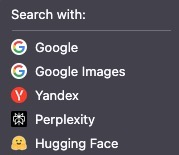
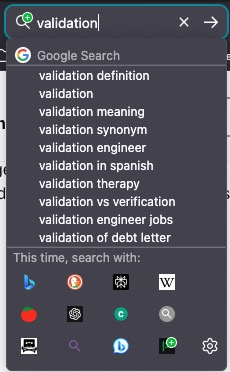
Firefox Search Field changed to a drop-down with Icon + Search Engine Name instead of the previous 3-6 icons on a row with Search Engine Name only appearing when you hover over the Search Engine icon? How do I change Firefox back to the old Search Engine field user interface?
Attached is the new UI which takes up too much screen space if you have a lot of Search Engines installed in the Search Engine Field. I'd like to revert to the old code. If the old code is no longer in Firefox, what version do I have to downgrade to in order to get that old user interface back?
Keazen oplossing
For now you can revert to the previous layout of the search engine via about:config.
The new search bar widget is behind the "browser.search.widget.new" pref in about:config and got enabled in 149.
Dit antwurd yn kontekst lêze 👍 1Alle antwurden (5)
Keazen oplossing
For now you can revert to the previous layout of the search engine via about:config.
The new search bar widget is behind the "browser.search.widget.new" pref in about:config and got enabled in 149.
Thank you. Problem solved. Incredibly frustrating when developers decide to change a user interface without giving users an easy way to option back to the old user interface. I'd probably abandon Firefox all together if this feature was killed.
There will likely come a time where the code gets cleaned up and the old code is removed, but for now this is still possible.
You can leave comments and submit feedback via "Help -> Share Ideas and Feedback" or visit this website.
I had the same problem. Thanks for this question & answer. I agree with the original poster that the old search engine layout for the search bar is superior, but I would add another reason: the old layout is ergonomically more efficient.
In the old layout, the procedure is: (1) I type the search terms, and (2) I click on the desired search engine, and the search commences while automatically reverting to the default search engine in the search bar. In the new layout, the same task is less ergonomically efficient: to do the same thing: (1) I type the search terms, (2) I click on the search engine button and select the desired search engine, (3) I hit enter and the search commences, (4) I click the "x" icon next to the selected search engine to revert to the default search engine in the search bar. That is twice as many steps for the same result! The new layout is definitely worse from this user's perspective.
I just searched for "search bar" in the discussions section of the Mozilla Connect website at https://connect.mozilla.org, and I see that there are a TON of users complaining there about the change of layout of search engines in the search bar. So many people hate the new layout! I hope the Firefox developers are getting the message!