


How to Disable New Search Bar in v133

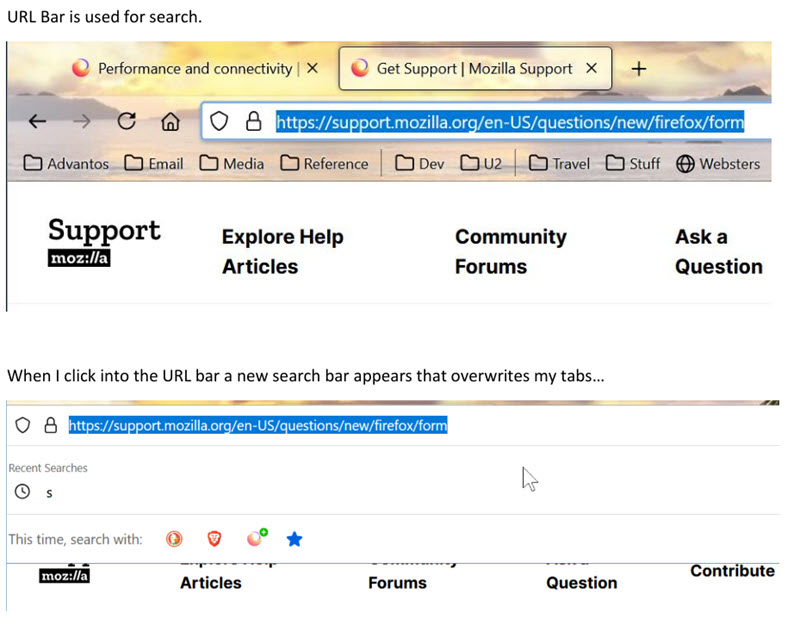
With the last couple of updates to Firefox (now running v133) on Windows 10 I noticed that there is a new search bar that overwrites the tabs on top of the Firefox window when I click into the URL bar, which is set up to be used for search. This began to happen recently but I'd like to know how to configure Firefox to do search like it used to, in the URL bar not a new search bar, and disable this new search bar that disorients me when it pops up and disappears.
Keazen oplossing
Ha! This was the culprit, actually the above is the CSS for Thunderbird. The pertinent section of the CSS for Firefox looked like:
  #urlbar[breakout][breakout-extend] {
     top: 5px !important;
     left: 0px !important;
     width: 100% !important;
     padding: 0px !important;
  }
So I deactivated it and voila`, all is as it should be. Thanks for your idea, I can't remember where I got this but it must have solved a different problem or it hadn't been implemented by FF until recently. Either way, I am now happy.
Alle antwurden (3)
Do you use any custom userChrome.css file?
Yes I do...
/* Set up the toolbars so the menu bar is on top and the tabs bar is second
  all above the new unified toolbar. I hide the menu bar and enable the Windows
  title-bar so everything looks like TB v102. */
- tabs-toolbar {
order: -1;
}
- toolbar-menubar {
order: -1;
}
/*Thunderbird now offers View > Density > 'Compact', 'Default', 'Relaxed' options */ /*#threadTree > table[is="tree-view-table"] td {
line-height: 21px !important;
} */
/* table view column buttons */
- threadTree button {
 background-color: #e0ebf5 !important;
 font-weight: bold !important;
}
/* message list hover color */
- threadTree button:hover {
 background-color: #cbe4fb !important;
 font-weight: bold !important;
}
/* This next section is experimental to try to change the hover characteristics
of the folder pane section */
/* Folder pane hover */ /* .container:hover {
background-color: #a8d1dc !important;
}
li.selected > .container:hover {
background-color: #a8d1dc !important;
}
- folderTree:focus-within li.selected > .container,
- folderTree li.drop-target > .container {
background-color: #a8d1dc !important;
}
- /
/* This is the end of the experimental section. It works but the default selection
when first opened doesn't use the new color(s). */
/* message list threads row height */ tr[is="thread-row"] { line-height: 24px !important; }
/* folder pane row height */ li[is="folder-tree-row"] { line-height: 23px !important; }
/* threads pane card height font */ .thread-card-container{
    height: 60px !important;
    font-size: 18px !important;
}
I hope this isn't the culprit. I'd never have upgraded TB unless the interface was fixable with this.
Keazen oplossing
Ha! This was the culprit, actually the above is the CSS for Thunderbird. The pertinent section of the CSS for Firefox looked like:
  #urlbar[breakout][breakout-extend] {
     top: 5px !important;
     left: 0px !important;
     width: 100% !important;
     padding: 0px !important;
  }
So I deactivated it and voila`, all is as it should be. Thanks for your idea, I can't remember where I got this but it must have solved a different problem or it hadn't been implemented by FF until recently. Either way, I am now happy.