


Windows 10 reached EOS (end of support) on October 14, 2025. If you are on Windows 10, see this article.

Sykje yn Support

Mij stipescams. Wy sille jo nea freegje in telefoannûmer te beljen, der in sms nei ta te stjoeren of persoanlike gegevens te dielen. Meld fertochte aktiviteit mei de opsje ‘Misbrûk melde’.

Mear ynfo

Dizze konversaasje is argivearre. Stel in nije fraach as jo help nedich hawwe.

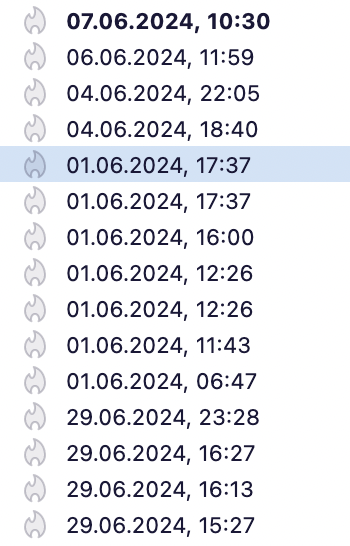
Date display error: all email erroneously dated to June

Since a week or two, Thunderbird displays all emails, in all accounts, in all boxes (in, sent, drafts, deleted, etc) as dating from "June". An email received 1 March 2024 is dated 01.06.2024; the previous email (of 29 February 2024) is displayed as 29.06.2024 (see screenshots). I have emails form "31.06.2024", "31.06.2023", "31.06.2022", and so on. It continues through all emails, down to the oldest one I am keeping of 25 October 2013, displayed as 25.06.2013.

When I open a mail in a separate tab or window, the same 'June' date is there. The correcte data information is not lost: I can still correctly sort my emails on date and when I forward an email, it contains the corrected date.

The problem persisted after update to the latest version (115.9.0). Mac Monterrey 12.7.3.
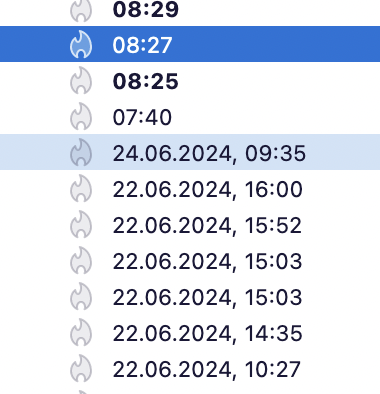
Since a week or two, Thunderbird displays all emails, in all accounts, in all boxes (in, sent, drafts, deleted, etc) as dating from "June". An email received 1 March 2024 is dated 01.06.2024; the previous email (of 29 February 2024) is displayed as 29.06.2024 (see screenshots). I have emails form "31.06.2024", "31.06.2023", "31.06.2022", and so on. It continues through all emails, down to the oldest one I am keeping of 25 October 2013, displayed as 25.06.2013. When I open a mail in a separate tab or window, the same 'June' date is there. The correcte data information is not lost: I can still correctly sort my emails on date and when I forward an email, it contains the corrected date. The problem persisted after update to the latest version (115.9.0). Mac Monterrey 12.7.3.
Keppele skermôfbyldingen

Bewurke troch matthias.verhelst op

Keazen oplossing

Solved - the problem was caused by a unexpected behaviour of the macos Date&Time settings.

Dit antwurd yn kontekst lêze 👍 0

Alle antwurden (1)

Keazen oplossing

Solved - the problem was caused by a unexpected behaviour of the macos Date&Time settings.