


Firefox relay

Is Firefox relay free? It says so here, Activate Firefox Relay - Mask your email address
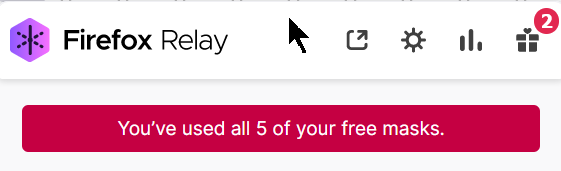
I decided to try it out. I was exploring it, seeing if I could create a mask with a chosen name, and now it says I used up all my free masks.
Since that's the case,. can I still choose the one of those I unwittingly created? Maybe there should be some kind of disclaimer?
Bewurke troch noel_envode op
Alle antwurden (5)
Hi
The free version of Firefox Relay has a limited number of masks, but you can delete a mask that you no longer need and generate a new mask as required.
Paul said
Hi The free version of Firefox Relay has a limited number of masks, but you can delete a mask that you no longer need and generate a new mask as required.Hi Paul,
Are you saying I can delete one of those I already have? Can I create a mask with a name of my choice?
I don't see anything in the settings that suggest that.
Bewurke troch noel_envode op
You can't chose a name. You still can use old ones, or delete them.
TyDraniu said
You can't chose a name. You still can use old ones, or delete them.ok, thanks, but how do you delete them? So, you can't have more that five, but you can replace them?
I'm surprised they don't give you the ability to look like legit email addresses, instead of spam with those random characters.
ok, thanks, but how do you delete them? So, you can't have more that five, but you can replace them?
Yes, on the relay.firefox.com page.
I'm surprised they don't give you the ability to look like legit email addresses, instead of spam with those random characters.
This is premium (paid) option.