


eBay - Now A Problem With Mozilla

I do a search - then get a page full of hits. I scroll down and click to open one eBay listing - and it creates a new window to the right. I scroll down and click to open another eBay listing - and it creates another window to the right. Pretty soon I have a dozen windows on the right, and this is slowing down my internet experience, until I manually close each one out.
Why can we no longer hit the "Back" arrow and return to the same place on that page?
Alle antwurden (6)
Can you try the same process in another browser and let us know what happens.
Now it seems that both Microsoft Edge and GoogleChrome do the same thing as Mozilla. They open a new window to the right of the item of interest. And it stays there until being closed out.
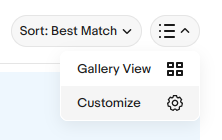
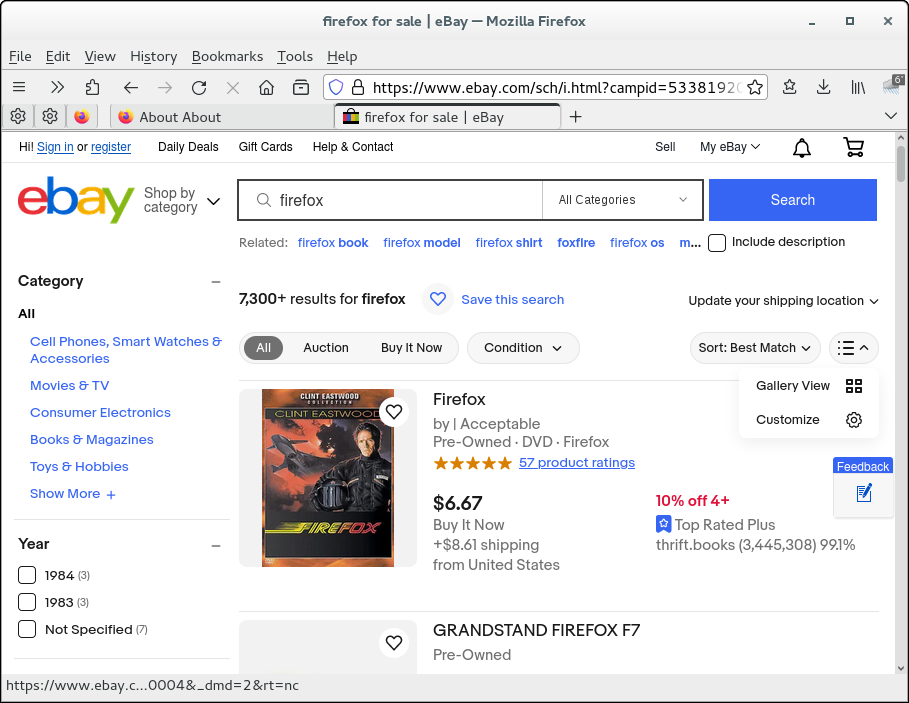
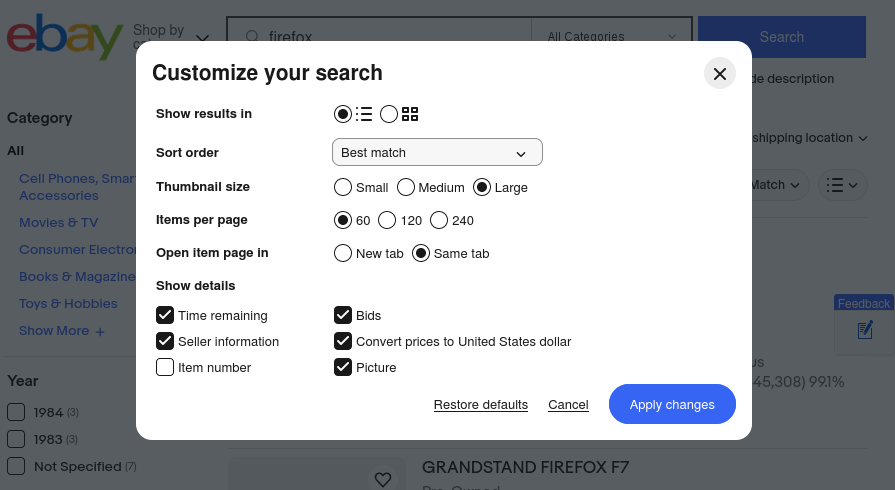
In a search listing, click on the three-bar icon on the right side (see screenshot) > Customize > "Open item page in" change from "New tab" to "Same tab".
You are onto something here. But I see no screenshot. In the 3-bar dropdown, I don't see Customize, and the only option I see is open in New Tab.
This is about the three-bar icon on the eBay search page and not about the Firefox menu button. You can see this icon next to Sort: Best Match in the first screenshot. The second screenshot shows the pop-up you see if you click the Customize gear icon.
Bewurke troch cor-el op
I don't see any 3 bars on Ebay. Below is what I see: