


On the mail tab, the email list's "Subject" column is not left-justified.

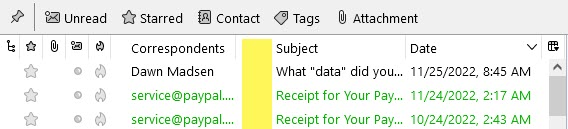
On the mail tab, the email list's "Subject" column is not left-justified (or maybe it's left-padded). However, my other columns like "Correspondents" and "Date" are left-justified. Because of the extra left-hand space in the "Subject" column, the subject line shown is reduced by about 5-7 letters.
I have my layout setup as vertical panes. For ease-of-reading/navigation I won't be switching over to a horizontal layout, even though I can have wider columns in that layout.
Please refer to the yellow-highlighted area on the attached picture.
Is there a solution for having "Subject" line up like the other columns?
Thanks in advance for any assistance. :-)
Keazen oplossing
@sfhowes Thanks so much for your reply!
I had forgotten about the reply/forward arrows since the email boxes I currently have setup in Thunderbird have emails that I mainly don't reply-to or forward. So, any of those arrows would have already been further down in my list and not in the current visible area.
I appreciate your time and clarification. :-)
Dit antwurd yn kontekst lêze 👍 0Alle antwurden (2)
It's possible with userChrome.css to move the column names to the left of the column box, but then 'Subject' is not aligned with the header text, which is already left-aligned to allow for the reply/forward arrows to the left of the text. Same with the Correspondents column, which leaves space for the left/right arrows to the left of the text.
The first picture shows the standard layout, while the second shows the column names 1px from the left column separator. Note that the orange colour and bold font are already customized with css.


Keazen oplossing
@sfhowes Thanks so much for your reply!
I had forgotten about the reply/forward arrows since the email boxes I currently have setup in Thunderbird have emails that I mainly don't reply-to or forward. So, any of those arrows would have already been further down in my list and not in the current visible area.
I appreciate your time and clarification. :-)