Download arrow

Somehow my download arrow dissapeared and don't show unless I download again something. I miss it. Is there any setting option to keep it always on the panel?
Somehow my download arrow dissapeared and don't show unless I download again something. I miss it. Is there any setting option to keep it always on the panel?
Alle antwurden (2)

Change this preference to false in about:config. browser.download.autohideButton
https://support.mozilla.org/en-US/kb/about-config-editor-firefox
IIRC, when the button is showing, you can right-click it and select an option to show it always.
Bewurke troch Terry op
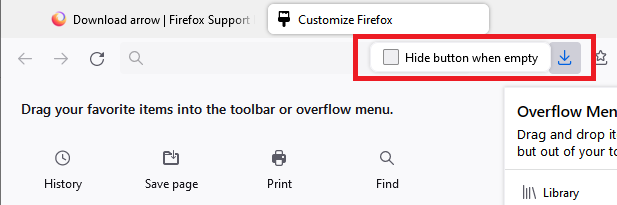
The third method involves calling up Customize, then left-clicking the button to call up a little form, then un-checking the box to hide the button.
Customize Firefox controls, buttons and toolbars