


Thunderbird account setup can't reach gmail account

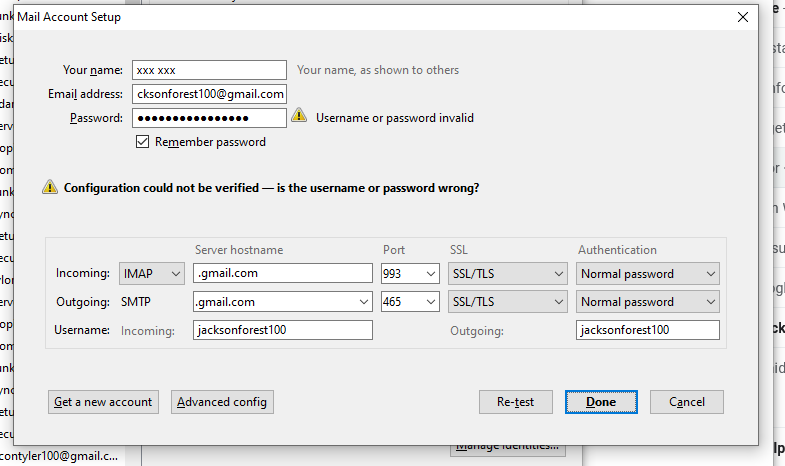
I recently added a new gmail address. When I attempt to add a new account to thunderbird for this email address, thunderbird says the email address and password don't match. This is definitely not true. They match. I have checked multiple times. I added a new account for this address to my iphone Mail app with no problem. Attached is a screen shot showing the situation.
At some point in my efforts, an account was created even though the error message in the setup were there, but when I tried to download messages, I got the error message: "Couldn't contact server."
Any ideas?
Keazen oplossing
The correct servers are imap.gmail.com and smtp.gmail.com, and the authentication should be OAuth2. Click Advanced config. if OAuth2 isn't in the authentication drop-down and select it in Server Settings and also in Outgoing Server (SMTP). The User Name must also be the full email address.
I wonder what your TB version is, as current version 91 automatically finds the correct settings when adding a gmail account.
Dit antwurd yn kontekst lêze 👍 1Alle antwurden (2)
Keazen oplossing
The correct servers are imap.gmail.com and smtp.gmail.com, and the authentication should be OAuth2. Click Advanced config. if OAuth2 isn't in the authentication drop-down and select it in Server Settings and also in Outgoing Server (SMTP). The User Name must also be the full email address.
I wonder what your TB version is, as current version 91 automatically finds the correct settings when adding a gmail account.
Thanks, upgrade solved my problem. Help/About said I had latest version, but this was not true. Downloaded and installed latest version. All is well.
Thank you.