


1 Gmail account + 2 Thunderbirds on separate computers = Total mess

Hello,
We're using 1 Gmail (Google Workspace paid) account, and we'd like several people to be able to check the email address at the same time (to ensure a faster response time).
When the Gmail address receives a new email, here's what happens:
- Looks like the first Thunderbird that connects to the server downloads the message.
- The second Thunderbird then shows "no new messages".
- In a rare instance, looks like both Thunderbirds were connecting to the server at the exact same moment, and got a copy of the email. It only happened once.
- Since then, we can't get the two Thunderbirds to receive the new emails, only one of them does.
Settings:
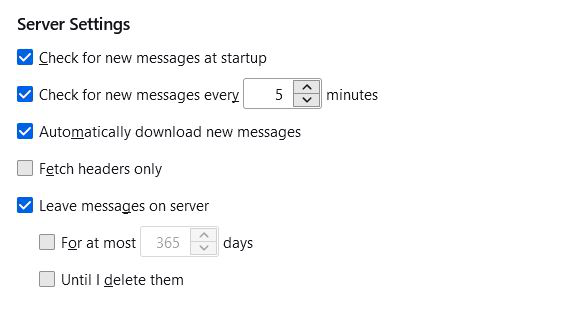
POP is selected, pop.gmail.com port 995 (We don't want to use IMAP otherwise if someone deletes an email or marks as read it affects everyone)
"Leave messages on server" is ticked "For at most .... days" is unticked "Until I delete them" is unticked
Computer 1 has Thunderbird 91.3.0 (32-bit) installed on Windows 8.1 Computer 2 has Thunderbird 91.3.0 (64-bit) installed on Windows 10 Pro
The same set up works perfectly fine on two other computers for a non-Gmail address. So perhaps the issue has to do with Gmail as well?
Thanks in advance for your help.
Alle antwurden (2)
Also, when I log on the Gmail account directly at gmail.com, all the emails are there, marked as unread. So it's not a case where one of the two TB deletes things
To download from a gmail POP account with multiple mail clients or computers, you must use 'recent mode'. Change the User Name in Server Settings from username@gmail.com to recent:username@gmail.com
http://kb.mozillazine.org/Using_Gmail_with_Thunderbird_and_Mozilla_Suite