


Syncing Three computers

I use three computers but one is my main computer. Is there a way to make these bookmarks my MAIN bookmarks to sync. It is annoying when I sync and my main computer bookmarks get all messed up because the other computers aren't current. I want the two other computers to sync to my main computer and not vice versa. Is there a way to set up the computers sync this way? Thank you in advance.
Alle antwurden (4)

I dont believe having sync work in one direction, ie from the main computer, and not to the main computer.
I've brought up my opinion with Mozilla about this feature being "fluid". And that the Sync should be more of a back up feature instead of an updating methodology.
At best, just keep the FF accounts disabled/logged out, to keep inadverdent updating of the main computer.
Also, you can make a copy of the data of the main computer, by cloning the profile. And you can rename the clones to "backup" and save them to other disks for safe keeping.
But in all fairness, the FF sync has come in very handy when a new profile is created and needs to be populated by the stored sync'd data.
btw: MSEdge can also be used as a backup for FF user data. Open it and check out the PW section.

Hi,
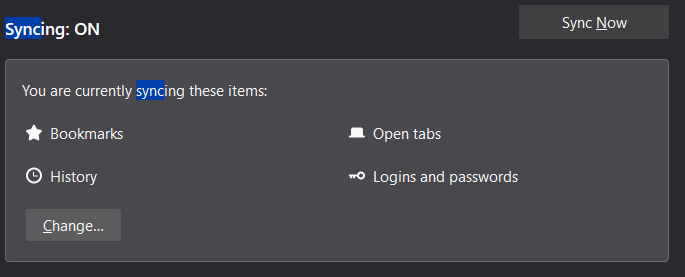
open menu -> options -> type sync in find on settings box
you will see your sync settings refer screenshot now click change to change your sync setting for you on your main computer don't change anything on your other computers click change and remove tick on Bookmarks now you will see bookmarks from your main computer on Firefox sync on other computers but you won't see any bookmarks from other computers on main computer
Glad to help.

With sync, there is no master. All selected data is shared with all members of the sync.
If you want to transfer the bookmarks from the main computer to other desktop devices and do not care about the current bookmarks on these devices then you can restore a JSON backup on these devices.