


Windows 10 reached EOS (end of support) on October 14, 2025. For more information, see this article.

Sykje yn Support

Mij stipescams. Wy sille jo nea freegje in telefoannûmer te beljen, der in sms nei ta te stjoeren of persoanlike gegevens te dielen. Meld fertochte aktiviteit mei de opsje ‘Misbrûk melde’.

Mear ynfo

Dizze konversaasje is argivearre. Stel in nije fraach as jo help nedich hawwe.

Ctrl+C copy text with metadata. How delete them?

  • 1 antwurd
  • 1 hat dit probleem
  • 24 werjeftes
  • Lêste antwurd fan cor-el

mear opsjes

Hello everyone, I accidentally noticed that when I paste (Ctrl+V) text into the desktop version of Evernote from vk.com, a hyperlink from vk.com appears in Evernote at the top. The link leads to the page from which I took this text. I inserted this text into various text editors by Ctrl+V, plane text without any hyperlinks is inserted. Checked the Windows clipboard, there is also only plane text. Searching the internet, I found a CLCL program that caches the clipboard, and this is what I saw (see the picture in the attachment). I just copied the text, not the page form. Has anyone come across an extension that removes all metadata when copying text from a site page?

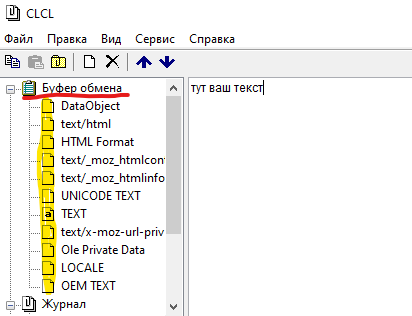
Hello everyone, I accidentally noticed that when I paste (Ctrl+V) text into the desktop version of Evernote from vk.com, a hyperlink from vk.com appears in Evernote at the top. The link leads to the page from which I took this text. I inserted this text into various text editors by Ctrl+V, plane text without any hyperlinks is inserted. Checked the Windows clipboard, there is also only plane text. Searching the internet, I found a CLCL program that caches the clipboard, and this is what I saw (see the picture in the attachment). I just copied the text, not the page form. Has anyone come across an extension that removes all metadata when copying text from a site page?
Keppele skermôfbyldingen

Alle antwurden (1)

mear opsjes

A normal (plain) text editor only gets the text/unicode flavor from the clipboard. A rich text or HTML editor usually defaults to using the text/html flavor on the clipboard when present and that include meta data, so to remove the meta data you can paste the text in a plain text editor as an intermediate action and then copy it again to the clipboard.