


cookies no longer seem to work for me in FireFox.

My proxy application server running under FireFox no longer is supporting cookies. The same script runs on Chrome fine.
http://www.scriptbasic.org/home/echo
What changed?
Keazen oplossing
Thanks for the suggestion which has resulted in it now working. The SERVER time wasn't synced to Internet time and was off. It now seems to work fine.
Strange that Chrome worked with the time offset difference.
Thanks everyone for your help resolving this!
Dit antwurd yn kontekst lêze 👍 0Alle antwurden (17)
Do you have Firefox set to delete your cookies upon closing?
My Firefox receives:
cookie1=1; path=/;expires=Mon, 26-Feb-18 6:11:38 GMT;
cookie2=2; path=/;expires=Mon, 26-Feb-18 6:11:38 GMT;
cookie3=3; path=/;expires=Mon, 26-Feb-18 6:11:38 GMT;
The cookies are not recognized in Firefox 58.0.2 or in Firefox 52esr.
Can you get rid of the line breaks and the trailing semicolon (at the very end)?
https://developer.mozilla.org/docs/Web/HTTP/Headers/Set-Cookie
Bewurke troch jscher2000 - Support Volunteer op
I have the same behavior in Chrome as in Firefox. (The cookies are undefined on reload.)
You have to resubmit the echo page within 10 seconds or the cookies expire. As mentioned, it works fine in Chrome.
There was a note about cookies in the docs that 'secure' is no longer supported with http. I have the secure argument set to 'false'.
This seems fine: https://www.jeffersonscher.com/res/setcookie.php
When I compare the expiration times, yours are different from mine.
oatmeal=raisin; expires=Mon, 26-Feb-2018 07:51:46 GMT; Max-Age=10; path=/
chocolatechip=semisweet; expires=Mon, 26-Feb-2018 07:51:46 GMT; Max-Age=10; path=/

cookie1=1; path=/;expires=Mon, 26-Feb-18 7:50:2 GMT;
cookie2=2; path=/;expires=Mon, 26-Feb-18 7:50:2 GMT;
cookie3=3; path=/;expires=Mon, 26-Feb-18 7:50:2 GMT;
Your script is sending a two-digit year and the times are not padded out with zeroes.
Perhaps these are treated as expired on arrival?
Good catch and idea but it didn't fix the problem. :-(
PRINT FormatDate("expires=WDN, 0D-MON-YEAR 0h:0m:0s GMT;",GMTIME),"\n"
expires=Mon, 26-Feb-2018 10:51:01 GMT;
If you can recheck the Script BASIC 'echo' script again and confirm your now seeing tasty cookies. ;-)
Positive Note: The change didn't break Chrome running the script.
Oops! That should have been a 0H for 24 hour format. Corrected on the server. Still no joy.
PRINT FormatDate("expires=WDN, 0D-MON-YEAR 0H:0m:0s GMT;",GMTIME),"\n"
expires=Mon, 26-Feb-2018 23:04:30 GMT;
These look sensible:
cookie1=1; path=/;expires=Mon, 26-Feb-2018 23:35:48 GMT;
cookie2=2; path=/;expires=Mon, 26-Feb-2018 23:35:48 GMT;
cookie3=3; path=/;expires=Mon, 26-Feb-2018 23:35:48 GMT;
Perhaps it's a clock issue? My local time according to the Web Console is:
var d=new Date(); d.toUTCString();
"Mon, 26 Feb 2018 23:36:55 GMT"
What puzzles me is why Chrome is sending them:
cookie1=1; path=/;expires=Mon, 26-Feb-2018 23:49:53 GMT;
cookie2=2; path=/;expires=Mon, 26-Feb-2018 23:49:53 GMT;
cookie3=3; path=/;expires=Mon, 26-Feb-2018 23:49:53 GMT;
var d=new Date(); d.toUTCString();
"Mon, 26 Feb 2018 23:51:19 GMT"
Seems Chrome set the expiration to 13 seconds after page load (attached screenshot). Odd.
For what it's worth, Internet Explorer 11 behaves like Firefox.
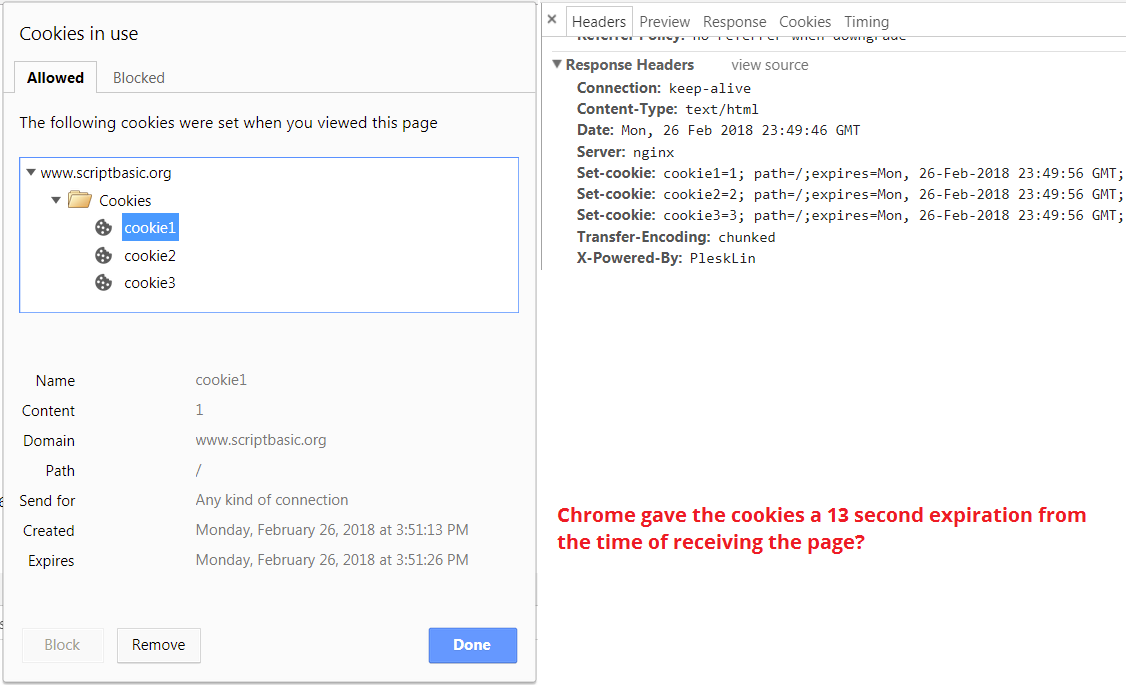
It hasn't been long ago that Firefox worked fine with this script. I was setting up a new server and noticed the echo program wasn't sending cookies in my default browser. (Firefox) I went to my Google Chrome backup to try, sure enough everything seemed fine. I'm a Linux guy so testing this with Explorer wasn't high on my list.
Anyone have an idea why the cookies are crumbling?
Bewurke troch ScriptBASIC op
Can you adjust the time on your server so it's not always behind the time on my PC? I think that might help.
https://www.timeanddate.com/ ("City" can be set to UTC)
My time is set via the internet. I assume with and atomic clock.
Chrome dev tools seems to see the cookies as well.
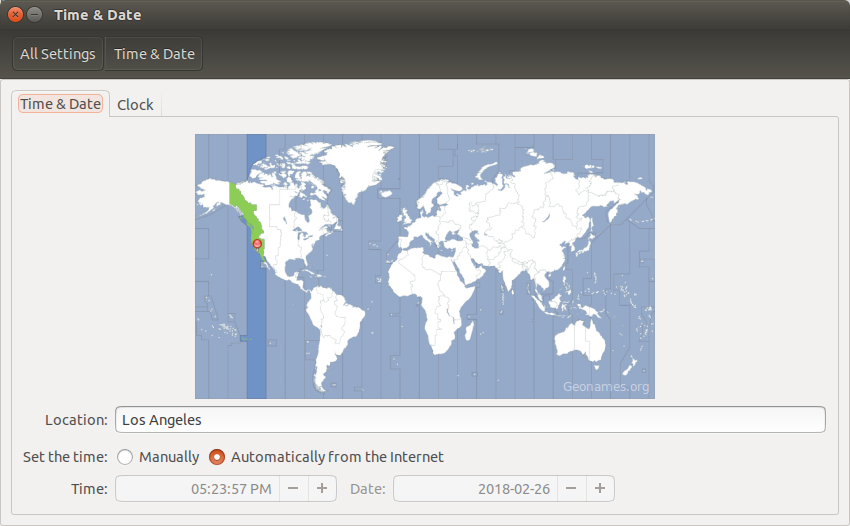
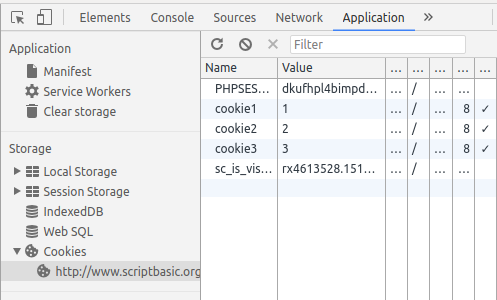
If this was a 'time' issue, why is Chrome working as expected?
Is Mozilla aware of this SetCookie issue?
How are people setting cookies in Fiirefox now?
Your page is still serving me expired cookies. I don't know why Chrome extends their expiration time. Maybe they have a documented explanation for that somewhere.
Did this page work for you in Firefox?
Your test PHP page is returning cookies fine.
I'll try setting the expire for 60 seconds instead of 10 and see if that helps.
Thanks for helping me out with this!
You can check the HTTP response headers in the Network Monitor to see that the time on the server is off for a few minutes.
Keazen oplossing
Thanks for the suggestion which has resulted in it now working. The SERVER time wasn't synced to Internet time and was off. It now seems to work fine.
Strange that Chrome worked with the time offset difference.
Thanks everyone for your help resolving this!