

Dizze konversaasje is argivearre.
Stel in nije fraach as jo help nedich hawwe.

Oplost
Argivearre
Display glitch on maximized screen - Firefox v57.0 64 bit

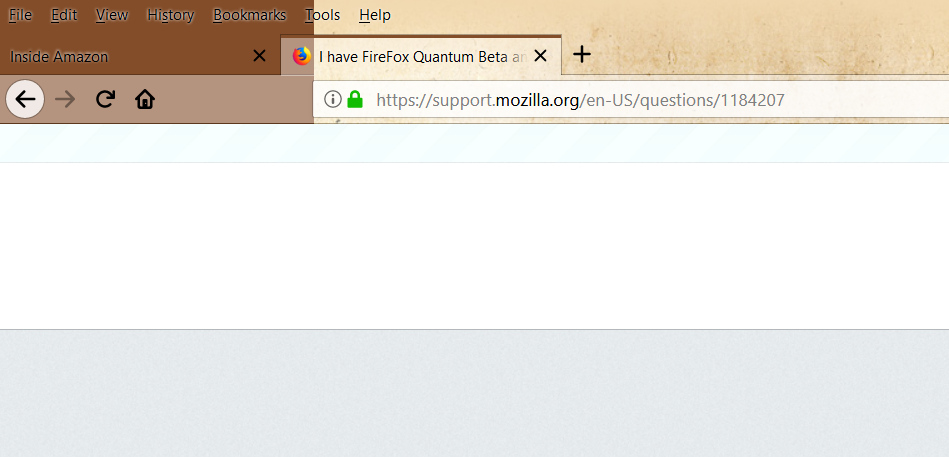
Since upgrading to Firefox v57 I have witnessed a display glitch in fullscreen mode
The menu bar, tab bar, and main address/icon bar are all a much darker color up to the start of the address field. Once the field element starts everything is back to normal
This does not appear to be effecting performance but the black text on dark brown makes it really hard to see the menu. When the window is not maximized it reverts back to normal coloring
Since upgrading to Firefox v57 I have witnessed a display glitch in fullscreen mode
The menu bar, tab bar, and main address/icon bar are all a much darker color up to the start of the address field. Once the field element starts everything is back to normal
This does not appear to be effecting performance but the black text on dark brown makes it really hard to see the menu. When the window is not maximized it reverts back to normal coloring
Bewurke troch bbatema op
Alle antwurden (1)
Keazen oplossing
hi, this is likely caused by the theme you're using - probably the background graphic isn't spanning the whole width of your screen. please try a different theme :))