My emails are all jumbled up and I dont know how to reset them in the correct chronological order.

My emails, both incoming and outgoing, are all jumbled up. How do I reset them to a normal chronological order?
My emails, both incoming and outgoing, are all jumbled up. How do I reset them to a normal chronological order?
Alle antwurden (1)
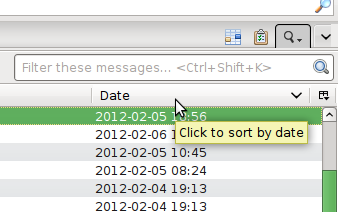
Click where it says "Date" to sort on the date column. Click on any column to sort by that column. A second click reverses the sorting order.
For a more thorough sorting, enable the menu and select View|Sort By.
No menu? Press alt or F10. Go to View|Toolbars and tick the checkboxes if you want the menu to stay visible.