


How can I change font size of incoming e mail?

I know and can change outgoing e mail font. Where do I go in system to change size of default size of incoming e mail, some of which is readable on PC but when I go to print, I need to magnify it.
There has to be an default setting somewhere.
TIA
Alle antwurden (10)

Tools|Options|Display|Formatting→Advanced
Choose "Latin" at the top, and set the minimum font size. Something like 14 perhaps.
i have to add "latin" to my fonts, will try later
What is selected at the moment? If you're having to install "latin" (I'm not sure if that's possible!) then what you're currently using will almost certainly do.
Current versions of Thunderbird have coalesced several encodings into Latin. If you have an older version of Thunderbird, you probably have "Western".
I am using current version--but no latin or western. I guess I will resort to trial and error. I could see the smaller font when I was younger; not as easy now. Stil beats alternative
Well, what do you see when you look at the display|formatting|advanced settings panel?
Whatever you're using at present, the important thing is to check the minimum font size setting.
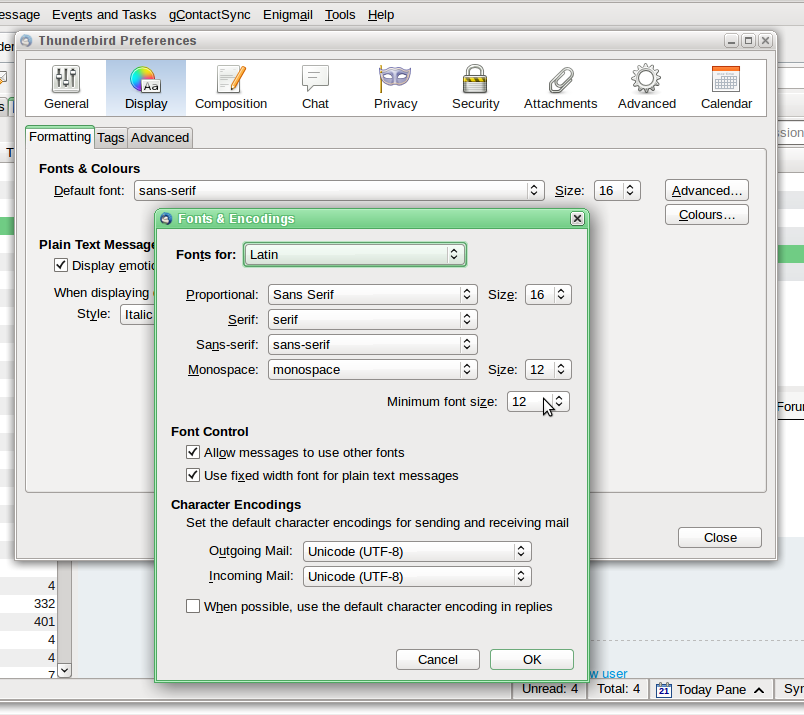
I have that box and I keep "walking up" the min font side and all that happens is that the mail I am typing gets larger and when I send it to my self it stays the same size. I know when we solve this it will be a "duh" moment. nonetheless its frustrating.
That setting determines how your email is displayed, and that means both incoming and outgoing.
Have you perhaps changed the font size in the composition window to help when writing messages?
Go to Tools|Options|Composition|General and make sure the font size under "HTML" is set to "medium".
that has been medium. I have to run out but I will get back to this --thanks so far for your help--unbelievable how responsive you are.
What does it say in the box at the top, where mine says "Fonts for: Latin"?
Latin