


Why does Youtube display text in Chinese?

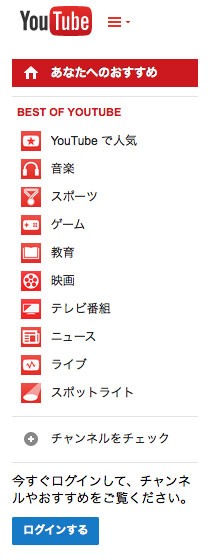
Youtube pages viewed in Firefox (36.0.1) on my Mac Mini running OSX 10.9.5 display some, but not all, of the text in Chinese. Pages display correctly in Safari and Chrome. I have reinstalled and refreshed Firefox with no change.
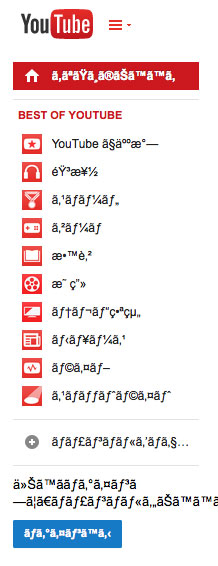
Changing View/Character Encoding to Western changes the display to English characters, but the words are gibberish.
See attached screenshots.
Keazen oplossing
It is the second screenshot that shows the wrong encoding. I missed that that screenshot was when you switched to Western, so that is to be expected.
Clear the cache and remove cookies only from websites that cause problems.
"Clear the Cache":
- Firefox > Preferences > Advanced > Network > Cached Web Content: "Clear Now"
"Remove Cookies" from sites causing problems:
- Firefox > Preferences > Privacy > "Use custom settings for history" > Cookies: "Show Cookies"
Alle antwurden (4)
That looks like an encoding issue where Unicode text is displayed as an 8-bit (Western or Windows) encoding.
You can check the currently used encoding and make sure the Unicode is selected.
- View > Character Encoding
You can also check for corrupted and duplicate fonts and other font issues:
- http://www.thexlab.com/faqs/multipleappsquit.html - Font Book 2.0 Help: Checking for damaged fonts
- http://www.creativetechs.com/iq/garbled_fonts_troubleshooting_guide.html
With View/Character Encoding set to Unicode we get the Chinese characters.
Keazen oplossing
It is the second screenshot that shows the wrong encoding. I missed that that screenshot was when you switched to Western, so that is to be expected.
Clear the cache and remove cookies only from websites that cause problems.
"Clear the Cache":
- Firefox > Preferences > Advanced > Network > Cached Web Content: "Clear Now"
"Remove Cookies" from sites causing problems:
- Firefox > Preferences > Privacy > "Use custom settings for history" > Cookies: "Show Cookies"
That fixed it. I removed all Cookies.
Thanks for your help.