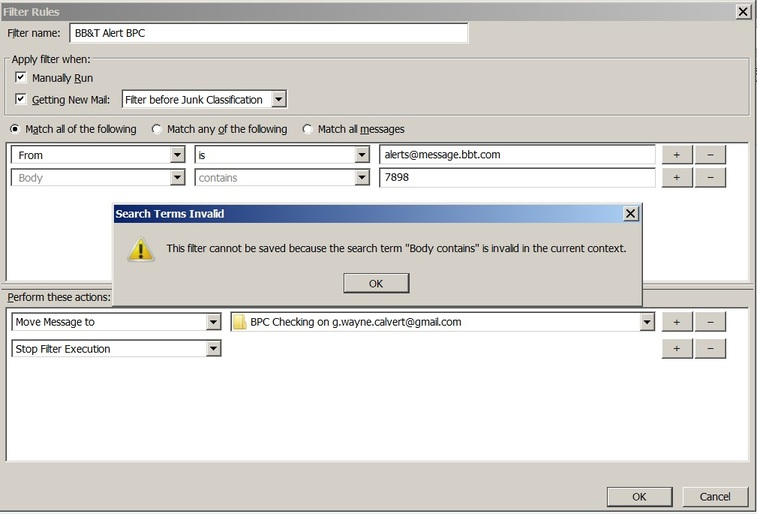
What happened to "body" "contains" in filters?

I have several filters that have "body" and "contains" that have stopped working. Opening these existing, and previously working, filters in edit shows the words "body" greyed out. Clicking OK I receive the message "This filter cannot be saved because the search term "Body contains" is invalid in the current context." What context?
Alle antwurden (2)
Keazen oplossing
Check that the filter is set for the correct mail account.
Can you post an image of the filter which is not working, so the forum can see exactly what you have set.
I have several pre existing filters that have stopped working. These filters are used to separate incoming messages from a single sender into separate sub folders based on data in the body of the message. When I open these pre existing filters the words “body” and “contains” are grayed out. Clicking OK I receive the error message “This filter cannot be saved because the search term “Body contains” is invalid in the current context.” Trying to create a new filter the drop down options no long contains the option “body.” What context and why has the option “body” no longer available?