


Firefox crashes

Every time when I first click on to facebook, it always indicates "plug in has stopped working" as soon as I press stop plug in....it goes. And continues to do this many more times on different sites...is this a problem with firefox ???
Keazen oplossing
What plugin is this about?
You can check for problems with current Shockwave Flash plugin versions and try this:
- check for updates for your graphics drive drivers
https://support.mozilla.org/kb/upgrade-graphics-drivers-use-hardware-acceleration - disable protected mode in the Flash plugin (Flash 11.3+ on Windows Vista and later)
- disable hardware acceleration in the Flash plugin
See also:
Dit antwurd yn kontekst lêze 👍 0Alle antwurden (3)
Hello,
Try Firefox Safe Mode to see if the problem goes away. Firefox Safe Mode is a troubleshooting mode that turns off some settings, disables most add-ons (extensions and themes).
If Firefox is open, you can restart in Firefox Safe Mode from the Help menu:
- In Firefox 29.0 and above, click the menu button
 , click Help
  and select Restart with Add-ons Disabled.
- In previous Firefox versions, click on the Firefox button at the top left of the Firefox window and click on Help (or click on Help in the Menu bar, if you don't have a Firefox button) then click on Restart with Add-ons Disabled.
If Firefox is not running, you can start Firefox in Safe Mode as follows:
- On Windows: Hold the Shift key when you open the Firefox desktop or Start menu shortcut.
- On Mac: Hold the option key while starting Firefox.
- On Linux: Quit Firefox, go to your Terminal and run firefox -safe-mode
(you may need to specify the Firefox installation path e.g. /usr/lib/firefox)
When the Firefox Safe Mode window appears, select "Start in Safe Mode".
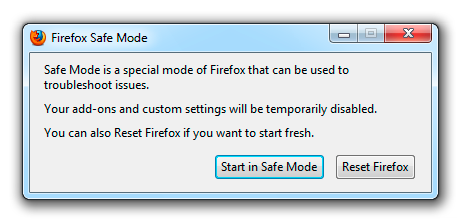
If the issue is not present in Firefox Safe Mode, your problem is probably caused by an extension, and you need to figure out which one. Please follow the Troubleshoot extensions, themes and hardware acceleration issues to solve common Firefox problems article to find the cause.
To exit Firefox Safe Mode, just close Firefox and wait a few seconds before opening Firefox for normal use again.
When you figure out what's causing your issues, please let us know. It might help others with the same problem.

With the last Firefox upgrade, some plugins are no longer enabled until you enable it.
Open the Add-ons Manager by Pressing the Alt or F10 key to bring up the tool bar. Followed by; Tools > Add-ons.
Hot key; <Control> (Mac: <Command>) <Shift> A)
On the left side of the page, select Plugins.
BTW; At the top right is a link to check your plugins.
Keazen oplossing
What plugin is this about?
You can check for problems with current Shockwave Flash plugin versions and try this:
- check for updates for your graphics drive drivers
https://support.mozilla.org/kb/upgrade-graphics-drivers-use-hardware-acceleration - disable protected mode in the Flash plugin (Flash 11.3+ on Windows Vista and later)
- disable hardware acceleration in the Flash plugin
See also: