


i have about 1/4 of my screen being taken up by white line and in the lefthand corner it says a plugin is needed to display this content. i have plugins

i would like to know how to get rid of this white line please help
Toutes les réponses (5)
Can you post a link to a public page that doesn't require authentication (log in) to access it?
Then we can check to see which plugin is used.
You can also try to attach a screenshot of the code that is used.
Right click that space and open the Inspector and check if you see an object or embed tag.
Use a compressed image type like PNG or JPG to save the screenshot.
it will not let me. i been trying to click on it but nothing happens. it is up on every page i go to.
Did you check that you do not have the sidebar open with a web page?
Is anything checked here in View > Sidebar ?
- Press F10 or tap the Alt key to bring up the "Menu Bar" temporarily if the Menu Bar is hidden.
Opening in the side bar is the default for bookmarks that are created via a link or button on a website.
You can check the Properties of a bookmark via the right-click context menu in the side bar (Ctrl+B; Cmd+B on Mac).
In the Bookmarks Manager (Bookmarks > Show All Bookmarks) you can click the More button in the Details pane at the bottom right.
Make sure that "Load this bookmark in the side bar" is not selected.
You can also check the home page setting:
here is a picture of it from my camera
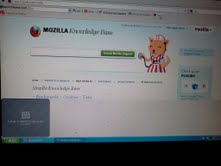
Do you have any toolbars installed that may cause it?
- View > Toolbars
- Firefox > Options
Start Firefox in Use Troubleshoot Mode in Firefox to check if one of the extensions or if hardware acceleration is causing the problem (switch to the DEFAULT theme: Firefox/Tools > Add-ons > Appearance/Themes).
- Don't make any changes on the Safe mode start window.
- https://support.mozilla.org/kb/Safe+Mode