


bookmarks toolbar is selected in view/toolbars, but doesn't appear - any hints?

when the bookmark toolbar is selected, a space for it appears where it should be (above the tabs) but with nothing on it. When you deselect, the space disappears. The items on the bookmark toolbar are accessible via the bookmarks menu (bookmarks/bookmarks toolbar). Another thing is that "organize bookmarks" option is not listed on the menu under bookmarks. Everything else is working fine.
Toutes les réponses (6)

- Go to View -> Toolbars -> Customize
- Drag the item shown in screenshot onto the bookmarks toolbar.
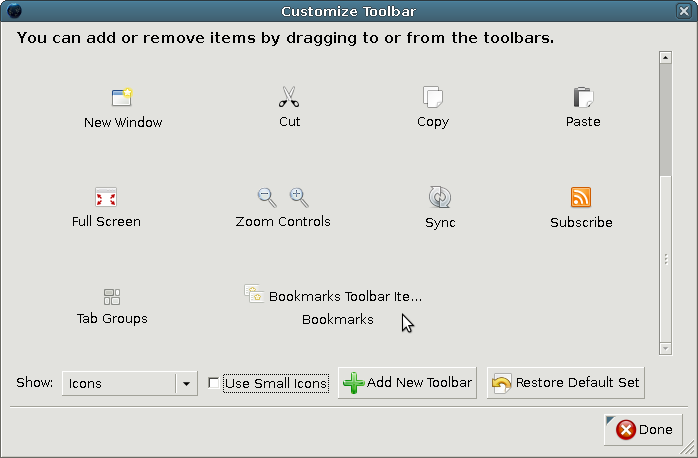
Also, perhaps it's a profile/add-on/plugin problem?.. Might wanna test that, by either starting Firefox in Use Troubleshoot Mode in Firefox and/or creating a new (fresh) Firefox Profile. :)
Thanks Gryllida - that fixed it. Appreciate your help. drmc
Good tips Corilya - I'll check these out too.
As far as Organize Bookmarks gone missing, that menu item was renamed to Show All Bookmarks in Firefox 4.
problem solved with the solution given by Gryllida. thanks m8!
Modifié le par Jingarelho