


All Folders under Email Account disappear

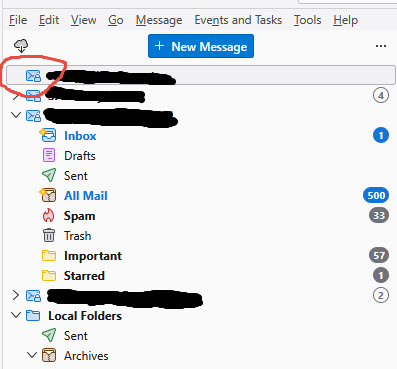
This has happened twice now when I open Thunderbird. My first email account on the left pane comes up with just the name of the account, no inbox, no folders, no nothing underneath it and it does not expand to show them. I'm not sure why this is happening, but the first time I actually had to completely delete and readd that account to fix the problem. I've searched various places for answers -- change folder views, change layouts, various other suggestions -- but nothing works to resolve the issue. Any help would be greatly appreciated as this is really annoying.
Toutes les réponses (1)

Check if you are at version 159 (most likely) if so here are some observations.
I had this on two machines in the past few days running latest Win11 26H2 with TB 159 after that update. I tried redoing the account, using a fresh profile, reinstall nothing worked. After finding some traffic on another forum I downgraded to version 158 as a test (note this requires modifying your profile or running an allow command on Windows to allow roll back to work with your existing profile).
I have submitted a Bug report on bugzilla Bug2088050 admitting a poor one (my fist one) as I did not generate logs. I searched first but only after submitting I found some similar reports.
It looks like the developers are aware and a patch is coming from what I can see. I hope this helps -Bill