


Windows 10 reached EOS (end of support) on October 14, 2025. If you are on Windows 10, see this article.

Rechercher dans l’assistance

Évitez les escroqueries à l’assistance. Nous ne vous demanderons jamais d’appeler ou d’envoyer un SMS à un numéro de téléphone ou de partager des informations personnelles. Veuillez signaler toute activité suspecte en utilisant l’option « Signaler un abus ».

En savoir plus
Ouvert

InsertSignature button moved from formatting toolbar to top toolbar after Thunderbird 153.0.1 ESR update

maipenrai23

Hello,

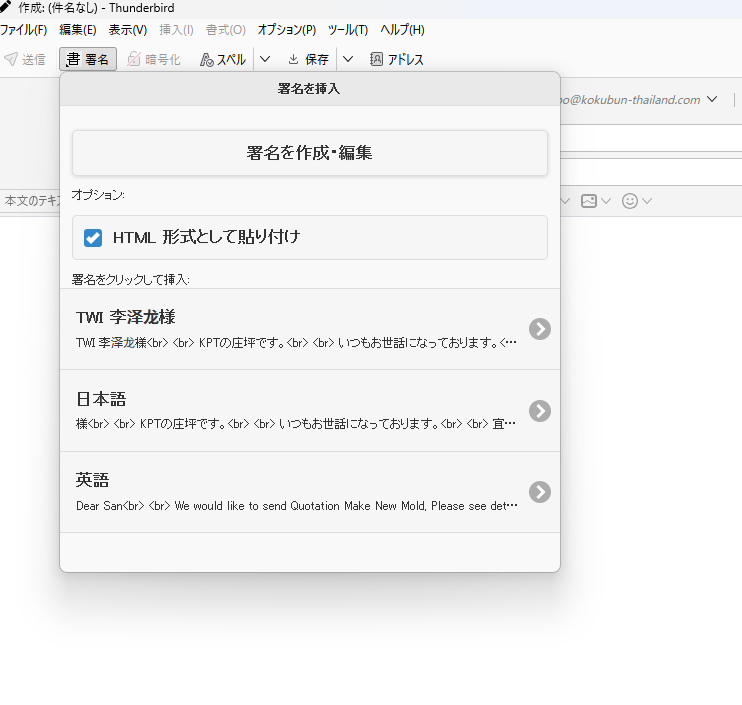
After updating Thunderbird to version 153.0.1 ESR (64-bit), the InsertSignature button changed its position.

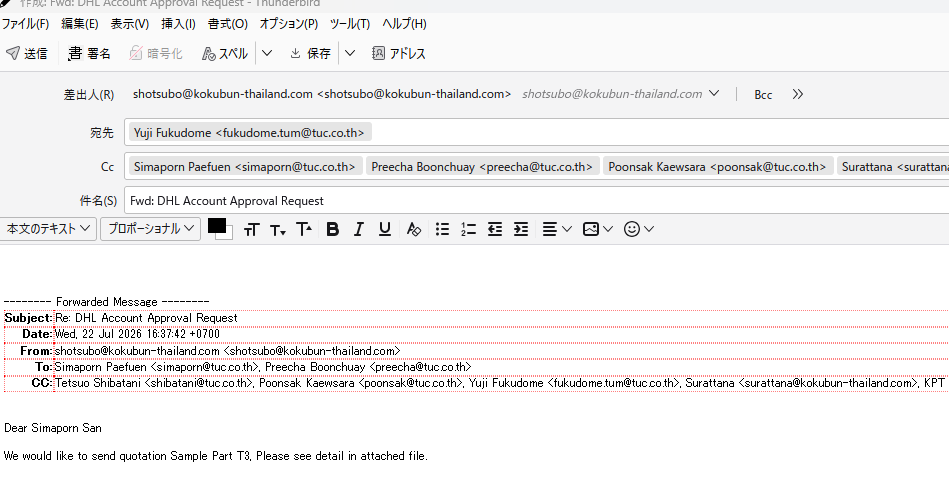
Before the update, the "Insert Signature" button was displayed near the message formatting toolbar, next to the "Body Text" selector.

After the update, the button moved to the top compose toolbar next to the Send button.

My environment:

- Thunderbird 153.0.1 ESR (64-bit) - Windows 11 - InsertSignature 0.4.5 - Quicktext 6.9.1

InsertSignature has not been updated recently (version 0.4.5), and this change appeared only after Thunderbird was updated.

The button used to be located immediately next to the "Body Text" selector in the formatting toolbar. Last Friday everything worked normally. Today (Monday) the button position changed.

Is this an intended UI change in Thunderbird 153, or is it a compatibility issue or bug?

If possible, is there any way to restore the button to its previous location near the formatting toolbar?

Thank you very much.
Hello, After updating Thunderbird to version 153.0.1 ESR (64-bit), the InsertSignature button changed its position. Before the update, the "Insert Signature" button was displayed near the message formatting toolbar, next to the "Body Text" selector. After the update, the button moved to the top compose toolbar next to the Send button. My environment: - Thunderbird 153.0.1 ESR (64-bit) - Windows 11 - InsertSignature 0.4.5 - Quicktext 6.9.1 InsertSignature has not been updated recently (version 0.4.5), and this change appeared only after Thunderbird was updated. The button used to be located immediately next to the "Body Text" selector in the formatting toolbar. Last Friday everything worked normally. Today (Monday) the button position changed. Is this an intended UI change in Thunderbird 153, or is it a compatibility issue or bug? If possible, is there any way to restore the button to its previous location near the formatting toolbar? Thank you very much.
Captures d’écran jointes

Toutes les réponses (1)

Since this is a feature of the InsertSignature add-on and not of Thunderbird itself, you'll be better off asking the add-on's developer. The add-on page has links to his email and project site.

https://addons.thunderbird.net/en-US/thunderbird/addon/insertsignature/

Poser une question

Vous devez vous identifier avec votre compte pour répondre aux messages. Veuillez poser une nouvelle question, si vous n’avez pas encore de compte.