


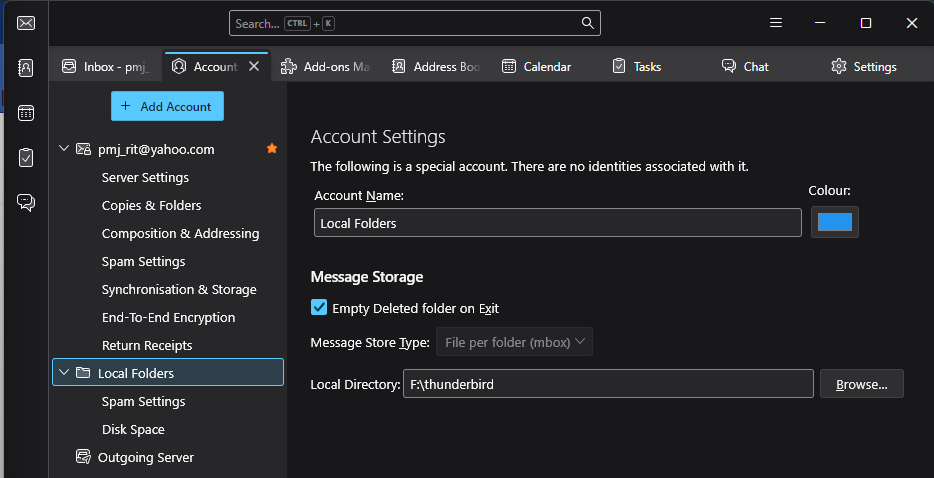
I have changed the local directory and nothing is being stored there.

Fix the program.
Toutes les réponses (12)

What precisely did you do?
What did you expect to happen?
What error messaged do you see? Please quote in full, verbatim. Screen shots would suffice.
What is your operating system?
What version of Thunderbird?
The program is not broken.
OS windows 11
I changed the local directory in settings. I don't want it to use the system drive.
There was no error message.
The version was requested (in its own field) and I did type it in but it does not seem to appear in the message. It is 152.0
The screenshot shows F:\thunderbird which still has nothing in it.
Now: as soon as I open Thunderbird it downloads new emails. Very good. Evidently it stores these somewhere (probably C:\Users\pmj_r\AppData\Local\Thunderbird\Profiles\g1ts01yx.default-release\cache2)
What I think it should do when the user asks for the localfolder to be set: 1) Go offline (notifying user and saying why - and allowing CANCEL) 2) Copy from the default location to the one set by the user (probably with something to indicate progress) 3) Verify the copy 4) empty the original directory 3) Go back online and notify user.
This is why I said: fix the program. No it isn't broken - it is incomplete, but then they always are.

The purpose of local folders is not to replace server folders. It is really a separate account. A combination of account settings and message filters could do much of what you want.
Using a POP account instead of IMAP might help you accomplish some of what you want too. @Lin knows POP better than I do.
Thank you.
I still don't understand why it's so difficult/complicated to do this.
Do you have an actual question or situation you are trying to resolve?
I want to prevent Thunderbird storing it's data on drive C:. I thought that should already be clear.
Don't worry - it's a free program...
TO keep the profile on C, but the data on F, do this:
- click help>troubleshootinginformatio
- scroll to profile folder and click 'open folder'
- exit thunderbird
- click to the desired account, whether imapmail or mail
- copy the account to drive f
- restart thunderbird
- click 'account settings'
- highlight the 'server settings' pane for the account
- change the local server to point to where you copied the account
- thunderbird will restart, pointing to drive f
- you may now delete the account via windows file explorer in the profile
pmj_rit said
I want to prevent Thunderbird storing it's data on drive C:. I thought that should already be clear. Don't worry - it's a free program...
That is discouraged. If you search the forum, you will find the reasons why, which I do not remember.
As I said, there are ways to accomplish much of what you want.
I still haven't seen a question or request for help. I will make a guess that you are actually asking how to move your Profile to another location on your computer. Here is a guide:
https://kb.mozillazine.org/Moving_your_profile_folder_-_Thunderbird
If I'm wrong and you want to suggest a feature, it can be proposed here: https://connect.mozilla.org/
If I'm wrong and you want to report a bug, it can be reported here: https://bugzilla.mozilla.org/enter_bug.cgi?product=Thunderbird&component=Untriaged
I defer to David.
Enough. Please don't trouble yourselves further. And (Lin) my question and it's meaning were very clear.
The guide is from 2018 so I'm a bit wary of it but thank you.
For anyone else reading this discussion: I erred when I wrote that putting Thunderbird data on another drive is discouraged. I do not know about that. I believe that running the app from another drive is discouraged.