


All of a sudden my emails are permanently staying in bold in my folders

All of a sudden my emails are permanently staying in bold in my folders, in Settings >Reading & Display Ive tried changing the 'Automatically mark messages as read radio buttons and quit etc and the same issue is happening, please advise
Toutes les réponses (2)

They're all bold meaning they are UNREAD . You need to mark them as READ.
Put your cursor at the very first email of your folder. Click on <Shift> button ( keep it down) Bring your cursor to the very last email of your folder. You should see all your emails selected You can release <Shift> button. Right click and then click on "Mark" and then click on "As read"
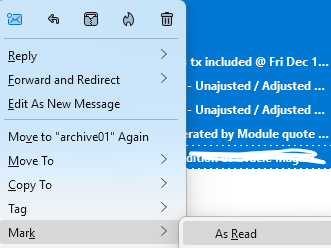
Modifié le par Michel T
Hi Michel, thanks for the response, unfortunately that's a more laboured approach to what I needed an answer for, previously and up until yesterday, my bold emails (unread emails) in my inbox could manually be individually selected, opened and the boldened title would switch to normal (as read) in Settings >Reading & Display Ive tried changing the 'Automatically mark messages as read radio buttons and changed the time the messages switch to as read but now I have to manually press 'M' on the keyboard to mark an email as read even after it has been read whereas previously the read email automatically went unboldened?