


Thunderbird not indexing folders (already rebuilt GloDa)

Hi all,
I'm desperately hoping someone can help me fix this so I don't have to dump Thunderbird for a different email client.
I have an email account hosted by some hosting company on a domain I own.
I noticed that Thunderbird was not returning certain emails when I searched for them. I searched, and found articles telling me to rebuild GloDa, so I followed the instructions to do that and quit Thunderbird and deleted the file. When I re-opened Thunderbird it started the re-indexing process, which I was viewing in the Activity Manager tool.
... except it only indexed a couple of the folders in my email account. It didn't index my archives, trash, spam, etc. It basically only archived the inbox and sent folders. I can see that from the list of completed tasks in the Activity Manager.
I've read on Mozilla's pages that Thunderbird indexes all folders, but it did not in my case, and as a result search is only returning a tiny proportion of my emails.
I need to be able to accurately track communications with my customers, so obviously if I can't get this fixed I'll have to move to a different email client.
I would greatly appreciate any help anyone can provide.
Solution choisie
As per this article:
https://support.mozilla.org/en-US/kb/global-search
Searching for spam and deleted messages
Trash and Spam folders are not searched by default. You may override this behavior for individual folders:
   Right-click such a folder.
   Click Properties in the context menu that opens.
   Check the box next to "Include messages in this folder in Global Search results."
   Click OK.
Lire cette réponse dans son contexte 👍 1
Toutes les réponses (5)
No trash and spam are not indexed by default. They are by definition garbage, not communications filed for your future reference so further disk space is not wasted indexing the garbage. I suggest you find another method of storing old mail other than the trash folder unless you want a catastrophic failure at some point. I can not speak specifically to the policies of "some hosting company" but it is normal practice with IMAP mail for the provider to routinely delete trash and spam folder content on a timed basis (usually around 14 days for spam and 30 days for trash). Providers that implement changes to their existing retention policies in this area rarely consult the user base before they act. When your mail provider deletes everything in the trash folder on the server, based on their retention policies, the IMAP account in Thunderbird will likewise synchronize the status change and delete the mail. That is how IMAP works, and as IMAP is the default I would expect you are probably using it.
However you can right click any folder and in properties set it to be polled for new message and indexed or not as you choose.
This specific scenario and change to default processing is covered in the support article here https://support.mozilla.org/en-US/kb/global-search#w_searching-for-spam-and-deleted-messages

Solution choisie
As per this article:
https://support.mozilla.org/en-US/kb/global-search
Searching for spam and deleted messages
Trash and Spam folders are not searched by default. You may override this behavior for individual folders:
   Right-click such a folder.
   Click Properties in the context menu that opens.
   Check the box next to "Include messages in this folder in Global Search results."
   Click OK.
Matt said
No trash and spam are not indexed by default. They are by definition garbage, not communications filed for your future reference so further disk space is not wasted indexing the garbage.
Hmm, I'll have to google again to find the Mozilla page that said otherwise. It explicitly said *all* folders are indexed by default. Since that's not the case that page should be changed.
Matt said
I suggest you find another method of storing old mail other than the trash folder unless you want a catastrophic failure at some point. I can not speak specifically to the policies of "some hosting company" but it is normal practice with IMAP mail for the provider to routinely delete trash and spam folder content on a timed basis (usually around 14 days for spam and 30 days for trash). Providers that implement changes to their existing retention policies in this area rarely consult the user base before they act. When your mail provider deletes everything in the trash folder on the server, based on their retention policies, the IMAP account in Thunderbird will likewise synchronize the status change and delete the mail. That is how IMAP works, and as IMAP is the default I would expect you are probably using it.
You are correct that my email host, like most, has a policy of routinely deleting messages out of the trash. However, I have an "archive" folder structure set up in my email host account (which is set to never delete), and I have Thunderbird configured to use that folder as the "trash," such that I can simply hit the delete key and send a message from the inbox to that archive folder.
So my archive folder is not the trash according to my host; just according to Thunderbird, so that when I "trash" a message in Thunderbird, it always goes to archives.
Try pressing A to archive and let the garbage be garbage.
Your modified settings to turn the archive into trash is a significant part of this issue. I do wonder how stuff deleted into the archive manages to retain it's folder structure and year per the archive options. My feeling is you have lost all that functionality through your choice of archive key.
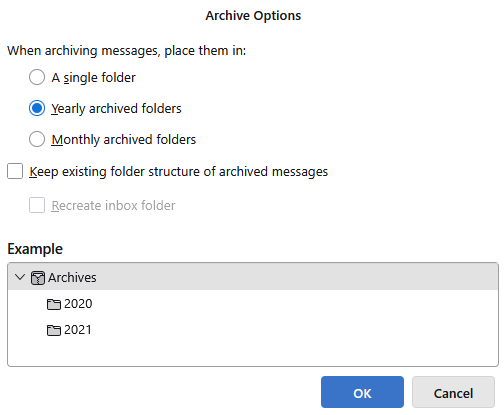
BTW Thunderbird will most likely not be syncing your archives to the server at all unless you open the appropriate folder. That is how the not checking of those two folders works, they are not polled for updates unless they are opened.