When our computer guy moved all info from our old computer to new, Thunderbird calendar was blank!

We have bought a new computer from our tech guy before. This time, all was fine except for the Thunderbid calendar. The 20 GB of email files are all there and email still works. Only the calendar is blank. Our guy admits he dislikes Mozilla and rarely deals with it. Is there any way we can find the contents of the calendar? The old computer is still here in our house, but we only have one monitor. I had birthdays, lots of birthdays setup as repeating events. I hate to lose that.
This is odd as we didn't lose anything the last time we bought a new computer from same guy. We already were running Windows 11, so that is not the issue.
Toutes les réponses (6)

If it's a network (CalDAV or other, such as Google Calendar), you can create a new calendar attached to it and all your events will be there. If it was a local calendar on the old computer, you can import it from your old Profile. Please describe your situation in more detail and we can give you some advice on how to do it.
Thank you, Lin. I have always backed up my Thunderbird profile in the way I learned right here on this help board. I back up to a jump drive. The calendar is local and on my profile and nowhere else. I did try to look at the calendar, but my computer skills are not enough. If you can walk me through how to get the info out of my profile and back into Thunderbid, I would be beyond thrilled!
What I cannot understand though is why all my emails are just fine as imported from the backup and the calendar is not. I may not need to know why, but I like to understand the why of things.
For the record, I am an old woman who started using a computer for work in 1985. This is probably before you were born. Insert shock emoji here.
A question for the future: Would I be better off using a Google calendar? I tried the calendar on my iPhone and hated it as clumsy and awkward. My all time favorite calendar was the Windows 95 shareware calendar from the UK. I am still able to display that on our Windows 11 computer, but I don't really use it anymore. I liked that I could print a month if needed. Thunderbird might do that, but I have not been able to see how.
OK. This assumes you have a full, un-zipped copy of your old Profile accessible on the jump drive or wherever. If it's a zipped file, made with Thunderbird's Export/backup tool, let me know - I don't personally use that, and the recovery procedure is a little different. Make a note of its location. Then in your current Thunderbird setup...
- From the Tools menu choose "Import..." to bring up the Import Tool.
- Choose "Import from another Thunderbird installation, then press the Continue button.
- Choose "Choose a profile folder". This will bring up a dialog box to let you navigate to the old Profile and select it. Click Continue.
- The next dialog box, "Import from a Thunderbird profile, gives you the options to import various things. Unselect everything but "Calendars". Click Continue.
- In the next dialog box, confirm that you are about to import Calendars and click "Start Import."
- The next dialog box will tell you that the import is Complete and when you click "Finish", Thunderbird will restart.
- After the restart, all you calendars should be there!
Please let me know how it goes, or if you're operating from a zipped backup.
(p.s. - I think we're contemporaries!)
EastTenn said
A question for the future: Would I be better off using a Google calendar? I tried the calendar on my iPhone and hated it as clumsy and awkward. My all time favorite calendar was the Windows 95 shareware calendar from the UK. I am still able to display that on our Windows 11 computer, but I don't really use it anymore. I liked that I could print a month if needed. Thunderbird might do that, but I have not been able to see how.
As for using Google Calendar, the advantages are that you can view and edit it from multiple devices, like you phone and other computers. A negative for me is that the Thunderbird Calendar has some notorious issues with event notifications from Google Calendars - they often can't be dismissed. This seems to not affect everybody, but it does me and others who have complained here. It's been going on for many years and seems unlikely to be fixed. The workaround is to disable notifications for that particular calendar. Also, I personally find the Thunderbird Calendar interface to be cluttered and unfriendly. I do have the Google Calendar installed in Thunderbird, but for day-to-day use I view it in my web browser. So, my answer is, yes, use Google Calendar, just be aware of its quirks.
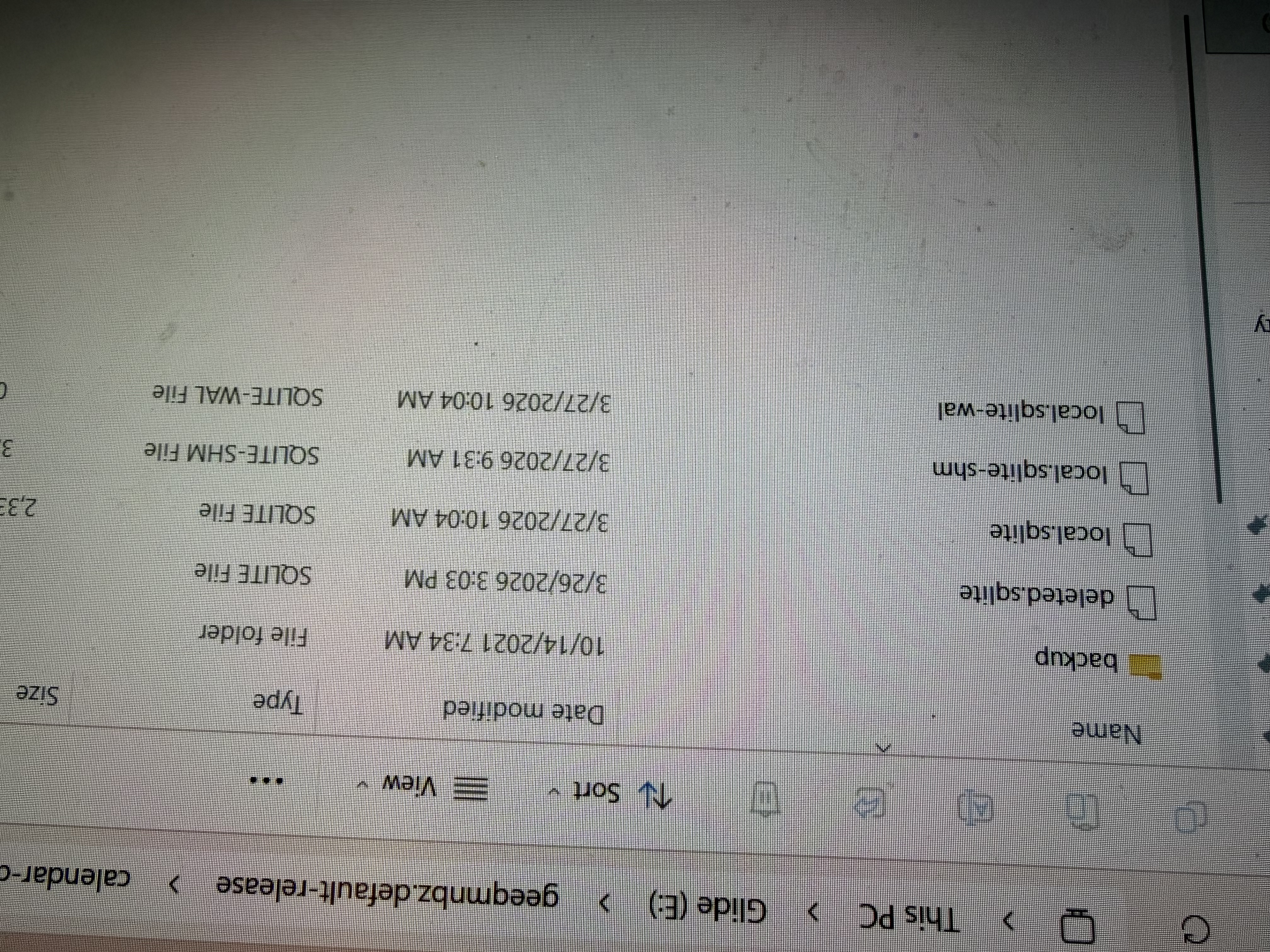
Lin, I gathered up my courage and began using your instuctions for the calendar. I hit a snag when I got to Choose a Profile folder. Instead of the dialog box that you mentioned, I got a church related folder. I tried various things. Then, I inserted my backup that I ran before the big changover to a new computer. and then took a literal picture of the screen. (I can do a screen shot on my phone, but have forgotten how to do that on the desktop,) The picture shows the insides of the folder marked Calendar on the backup. It does not look promising. I do not think the backup is a zip file. As I was able to open this folder and locate the subfolder Calendar, then I think it is not zipped.
Here is the name of the backup file as a whole geeqmnbz.default-release
If/when I can get the calendar to work, I think I shall try the Google calendar. I would LOVE to see my calendr on my phone, but th iPhone calendar is so awkward to use.
You hve been great. Thank you for your patience.