


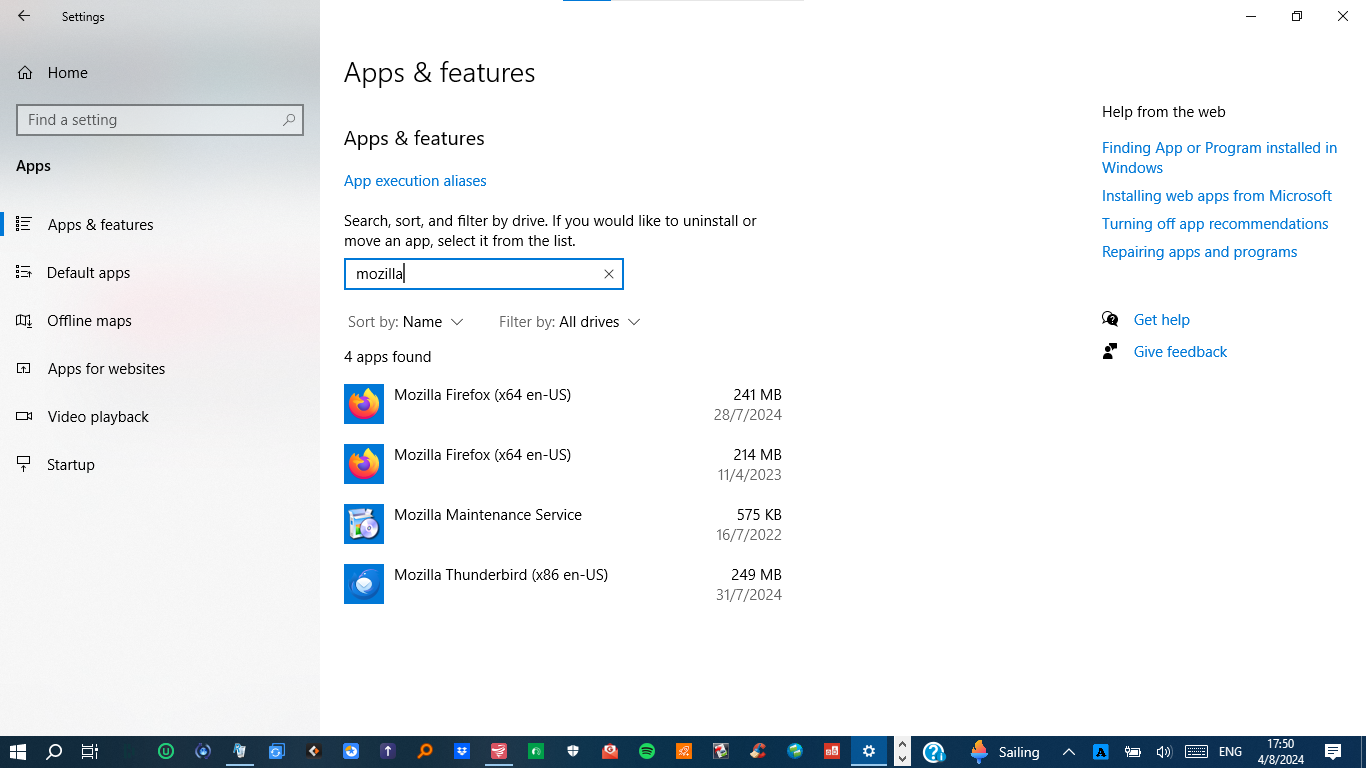
Two versions of Mozilla Firefox are installed on my PC.
Today I realized that I have installed two (2) versions of Mozilla Firefox on my Laptop PC which I rarely use.
Both editions are 64-bit type but one is version 109.0.1 (11/04/2023) in
C:\Program Files\Mozilla Firefox and the other is version 128.0.3 (28/07/2024) in C:\Program Files (x86)/Mozilla Firefox.
I suppose it is illegal to have two versions of the same App., so the question is how can I delete the old version (109.0.1) without affecting or damaging the new version (128.0.3)?
Thank you, JOHN HATZITOLIOS
Solution choisie
Finally, I fixed the issue by myself.
The fact that I had two copies of Mozilla Firefox on my PC was due to the existence of a second Windows account which I created some time ago.
Also, in this second account, I had installed a copy of Firefox which was settled down again in "C:\Program Files (x86)/Mozilla Firefox" creating all this issue.
From the second account, I removed Mozilla Firefox and that's all.
Anyway I thank you all, who deal with this problem of mine!
JOHN HATZITOLIOS
Lire cette réponse dans son contexte 👍 0Toutes les réponses (2)

rogergr311049, you can sometimes legitimately have two instances of Firefox installed, when they are a different "edition". I do not believe that you can have two instances of the same edition installed, even if they have different version numbers.
For example, I once had both the 32-bit and 64-bit stable release editions of Firefox installed at once. You can, I believe, also have both the stable release and developer's editions installed.
So I would suspect that you have two different editions installed, rather than having the same edition but with different version numbers.
Are you sure that both installed Firefox applications are 64-bit? Normally only 32-bit applications are installed into the Program Files (x86) folder.
When you normally launch Firefox, what edition / version does it state in Help menu / About Firefox?
Are you able to launch both your installed Firefox applications (with only one running at a time), and see how they describe themselves in About Firefox?
Modifié le par TechHorse
Solution choisie
Finally, I fixed the issue by myself.
The fact that I had two copies of Mozilla Firefox on my PC was due to the existence of a second Windows account which I created some time ago.
Also, in this second account, I had installed a copy of Firefox which was settled down again in "C:\Program Files (x86)/Mozilla Firefox" creating all this issue.
From the second account, I removed Mozilla Firefox and that's all.
Anyway I thank you all, who deal with this problem of mine!
JOHN HATZITOLIOS