Windows 10 reached EOS (end of support) on October 14, 2025. If you are on Windows 10, see this article.

Rechercher dans l’assistance

Évitez les escroqueries à l’assistance. Nous ne vous demanderons jamais d’appeler ou d’envoyer un SMS à un numéro de téléphone ou de partager des informations personnelles. Veuillez signaler toute activité suspecte en utilisant l’option « Signaler un abus ».

En savoir plus
Résolu Archivé

Extension is working in only certain tabs

MrQuackDuck a répondu
MrQuackDuck

I am developing an extension that will fix YouTube spacebar issue (after recent YouTube update after Alt Tabbing from other window, spacebar is not working to Pause/Play videos).

The problem is that my extension is not working anywhere except on https://www.mozilla.org.

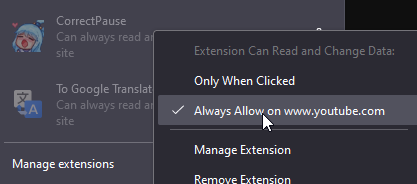
I've already added "*://*.youtube.com/*" to "host_permissions" in my manifest.json file and it's displayed as "Can always read and change data on this site" on YouTube, but it does nothing. On https://www.mozilla.org my extension is activating properly (writes test message in console).

I added my extension on "about:debugging". Can it be related with that? Appreciate any help!
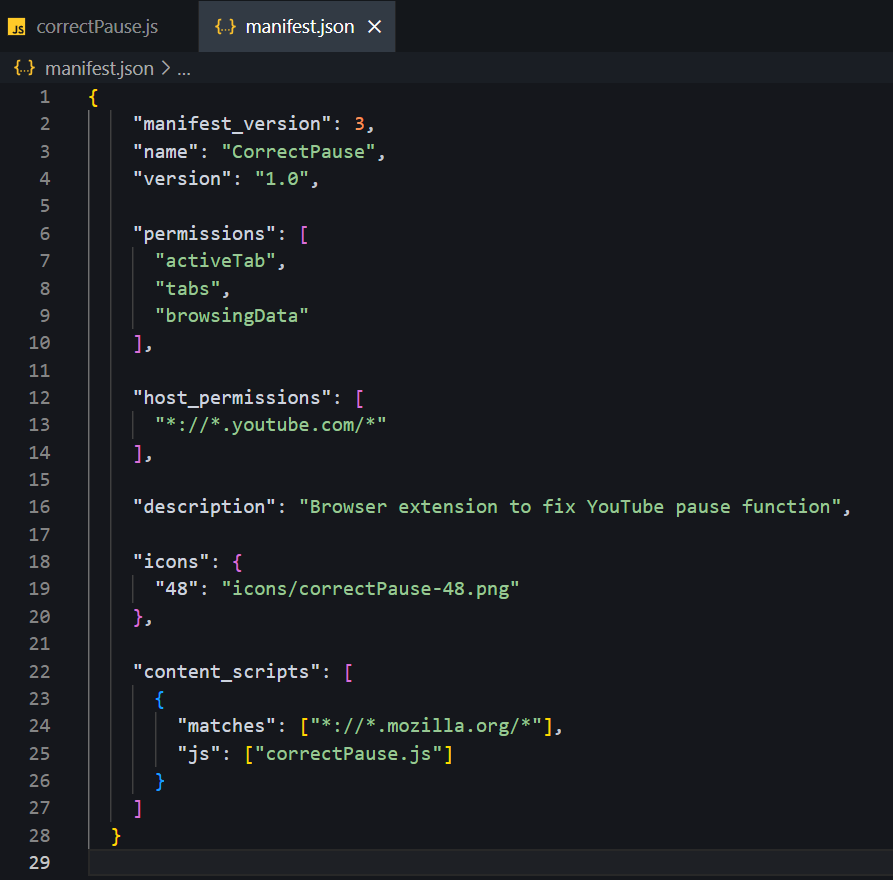
I am developing an extension that will fix YouTube spacebar issue ''(after recent YouTube update after Alt Tabbing from other window, spacebar is not working to Pause/Play videos)''. The problem is that my extension is not working anywhere except on '''https://www.mozilla.org'''. I've already added "*://*.youtube.com/*" to "host_permissions" in my '''manifest.json''' file and it's displayed as '''"Can always read and change data on this site"''' on YouTube, but it does nothing. On '''https://www.mozilla.org''' my extension is activating properly (writes test message in console). I added my extension on "about:debugging". Can it be related with that? Appreciate any help!
Captures d’écran jointes

Toutes les réponses (1)

Solution choisie

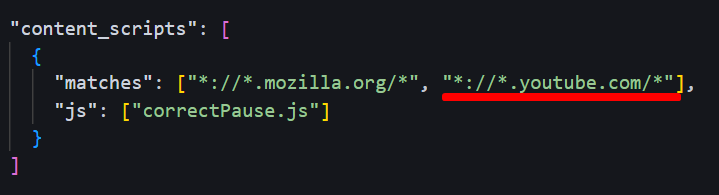
I just figured it out! I needed to add "*://*.youtube.com/*" to "matches" "content_scripts". (Image below)