


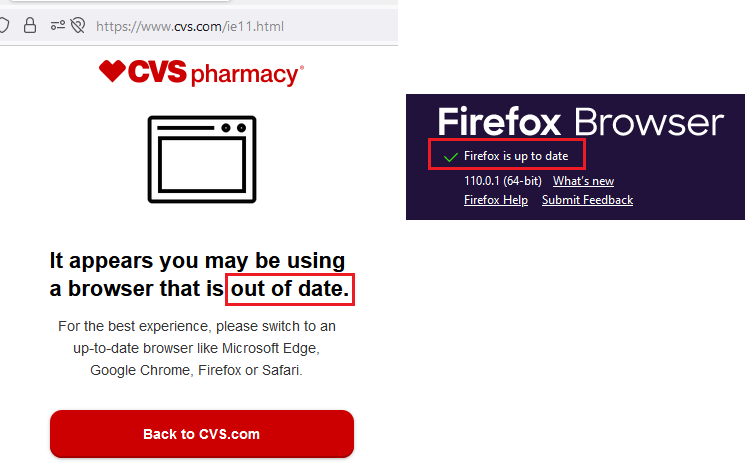
"It appears you may be using a browser that is out of date." but Firefox is current.

Hello, On https://www.cvs.com/ and entering data in the search box and selecting the search icon goes to https://www.cvs.com/ie11.html with the message "It appears you may be using a browser that is out of date." However, Firefox is current to 110.0.1 (64-bit). See the "out of date" message as well as Firefox Help > About showing Firefox is up to date. By the way, I'm running Windows 11. Pretty frustrating. Thank you, Steve
Toutes les réponses (3)
Could you check whether it helps to turn off your content blockers on the CVS site? Typically the add-ons for content blocking will have a toolbar button that allows you to make exceptions.
For Content Blockers I figure you mean add-ons. I restarted Firefox in Troubleshooting Mode, which disables the add-ons, and the issue still exists. I also started Firefox as normal with the add-ons enabled, manually disabled each add-on, and the issue still exists. Thanks, Steve
You may have disabled some features in Firefox.
Any relevant-looking messages in the Web Console about blocked content or not working features ?
Do you have enabled "Resist Fingerprinting" if you check this pref on the about:config page?
- privacy.resistFingerprinting => false
- https://support.mozilla.org/en-US/kb/firefox-protection-against-fingerprinting