


crash
Hello, Firefox is launching but I can no longer access sites. Even the "option does not open" function Have done more "troubleshooting" reinstall several times. Nothing. The case arises with kaspersky free on 2 pc. thank you
Toutes les réponses (2)
We're sorry to hear that Firefox is crashing. In order to assist you better, please follow the steps below to provide us crash IDs to help us learn more about your crash.
The crash report is several pages of data. We need the report numbers to see the whole report.
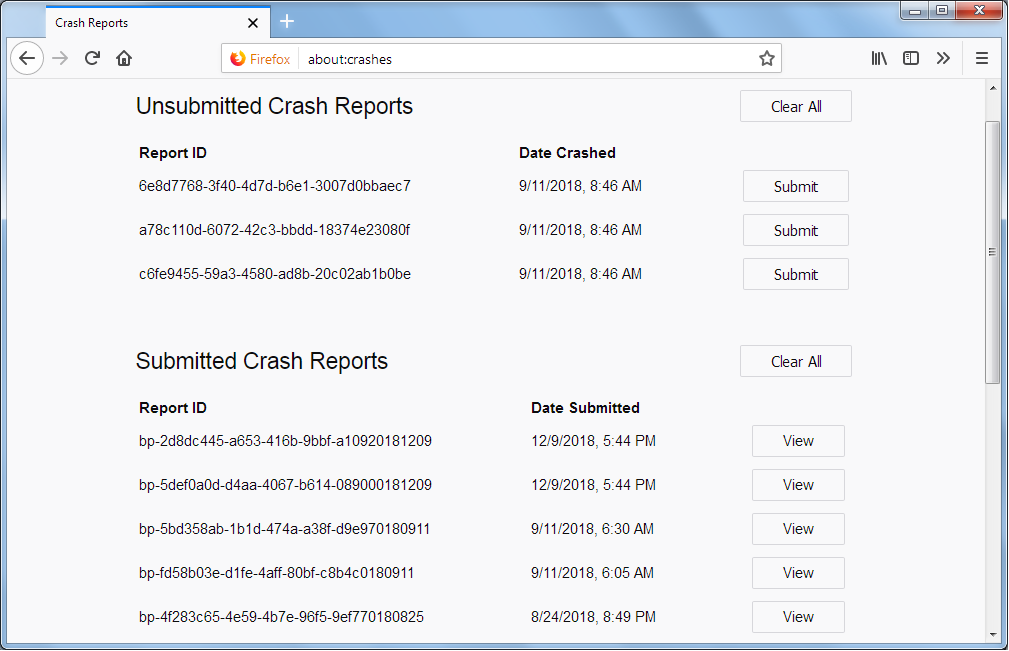
- Enter about:crashes in the Firefox address bar and press Enter. A list of Submitted/Unsubmitted Crash Reports will appear, similar to the one shown below.
- Copy the 5 most recent Submitted Report IDs that start with bp- and then go back to your forum question and paste those IDs into the "Post a Reply" box.
Note: If a recent Report ID does not start with bp- click on it to submit the report.
(Please don't take a screenshot of your crashes, just copy and paste the IDs. The below image is just an example of what your Firefox screen should look like.)
Thank you for your help!
More information and further troubleshooting steps can be found in the Troubleshoot Firefox crashes (closing or quitting unexpectedly) article.

Some problems occur when your Internet security program was set to trust the previous version of Firefox, but no longer recognizes your updated version as trusted. Now how to fix the problem: To allow Firefox to connect to the Internet again;
- Make sure your Internet security software is up-to-date (i.e. you are running the latest version).
- Remove Firefox from your program's list of trusted or recognized programs. For detailed instructions, see
Configure firewalls so that Firefox can access the Internet. {web link}