


bookmarks disappeared
Since refreshing Firefox, my bookmarks have disappeard from the bookmarks toolbar, there's nothing there. But Bookmarks are correctly selected in 'view', and also in 'configure', and the list of all bookmarks shows my usual bookmarks located in the toolbar section. I have no idea what to do about this. I attach a screenshot showing the empty area under the addrss bar.
Solution choisie
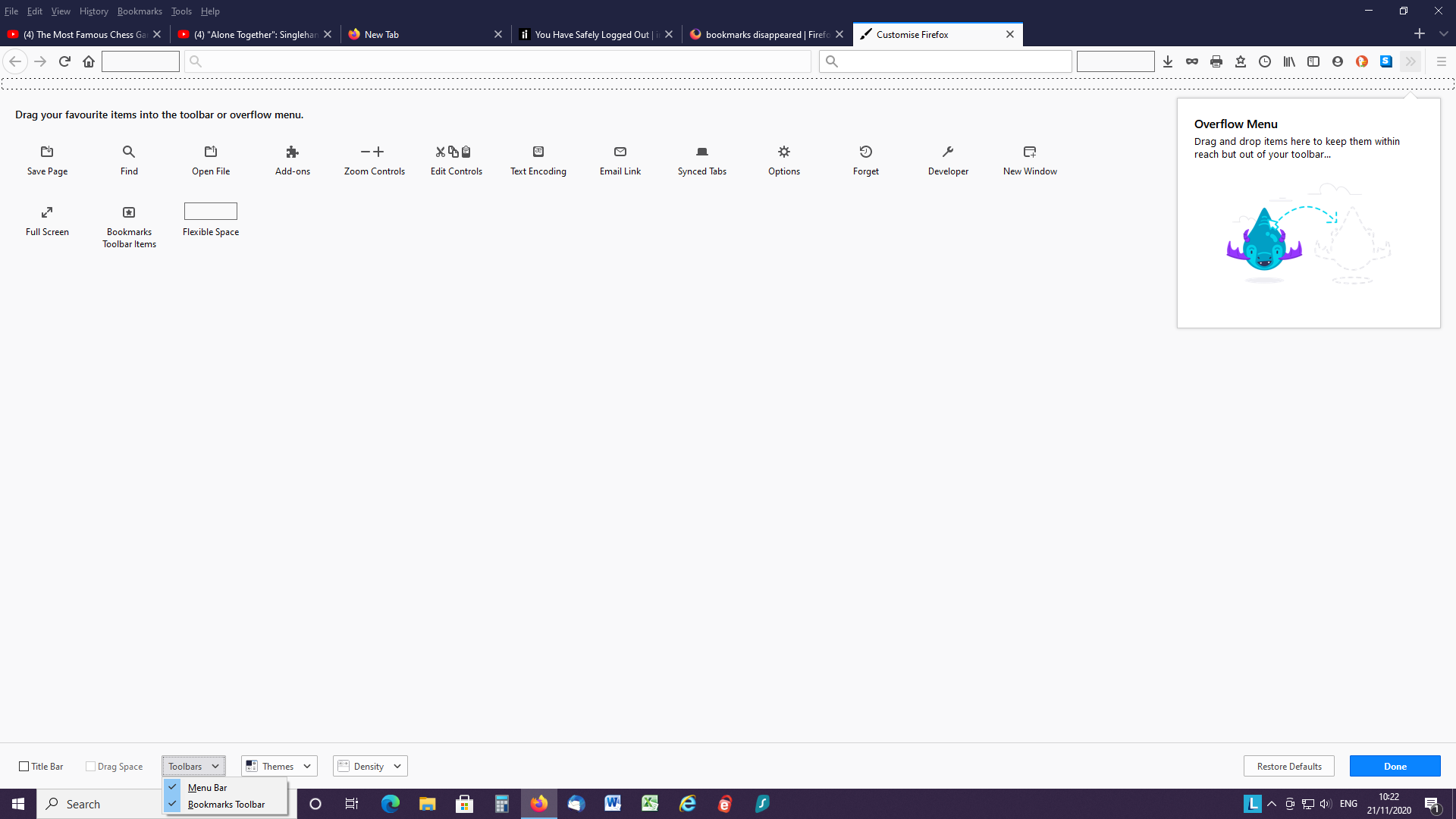
Hi, whilst in Customise mode drag Bookmarks Toolbar Items (a star inside a rectangle) onto the bookmarks toolbar - the long bar that is made up of small dashes in two rows.
I think the above will do it but if not, try clicking on Restore Defaults then Done at bottom right.
Finally, looking at your last screenshot, you seem to have a flexible space at the LH end of the address bar and another right of the search bar; try dragging them both into the Customise palette then click Done.
Lire cette réponse dans son contexte 👍 2Toutes les réponses (5)

Customize Firefox controls, buttons and toolbars {web link}
Type about:customizing<enter> in the address bar.
Note: about:customizing is no longer present in Firefox v47+ releases.
- Press Alt or F10 to bring up the Menu Bar.Then View > Toolbars > Customize.
- Right-click on a blank spot in the toolbar and select Customize.
Look for Show / Hide Toolbars at the bottom left.
There is also a Restore Defaults button at the bottom middle.
No, I already have view bookmarks toolbar correctly checked in 'customise'
Hello - I was wondering if anyone has any furthr ideas about this one, as it's beginning to bug me, thanks. Still no bookmarks toolbar despite all being checked correctly. I attach screenshot.

Solution choisie
Hi, whilst in Customise mode drag Bookmarks Toolbar Items (a star inside a rectangle) onto the bookmarks toolbar - the long bar that is made up of small dashes in two rows.
I think the above will do it but if not, try clicking on Restore Defaults then Done at bottom right.
Finally, looking at your last screenshot, you seem to have a flexible space at the LH end of the address bar and another right of the search bar; try dragging them both into the Customise palette then click Done.
Thanks - fixed it!