


Windows 10 reached EOS (end of support) on October 14, 2025. If you are on Windows 10, see this article.

Rechercher dans l’assistance

Évitez les escroqueries à l’assistance. Nous ne vous demanderons jamais d’appeler ou d’envoyer un SMS à un numéro de téléphone ou de partager des informations personnelles. Veuillez signaler toute activité suspecte en utilisant l’option « Signaler un abus ».

En savoir plus
Résolu Archivé

PDF won't display without plugin

cfcentaurea a répondu
drsaaron

I've used the built-in PDF viewer in firefox for quite a while to view PDFs without the need for a plug-in. But with FF38, that no longer works. The PDF just gets downloaded even though the option is set to preview in firefox. If I enable the Adobe plug-in, I can view the file but the browser is supposed to be able to handle this, and did quite nicely for quite a while.

I've used the built-in PDF viewer in firefox for quite a while to view PDFs without the need for a plug-in. But with FF38, that no longer works. The PDF just gets downloaded even though the option is set to preview in firefox. If I enable the Adobe plug-in, I can view the file but the browser is supposed to be able to handle this, and did quite nicely for quite a while.

Toutes les réponses (2)

Solution choisie

Hi drsaaron, please check Adobe Reader Application settings, and if that does not help try to delete the mimeTypes.rdf file in firefox profile folder.

thank you

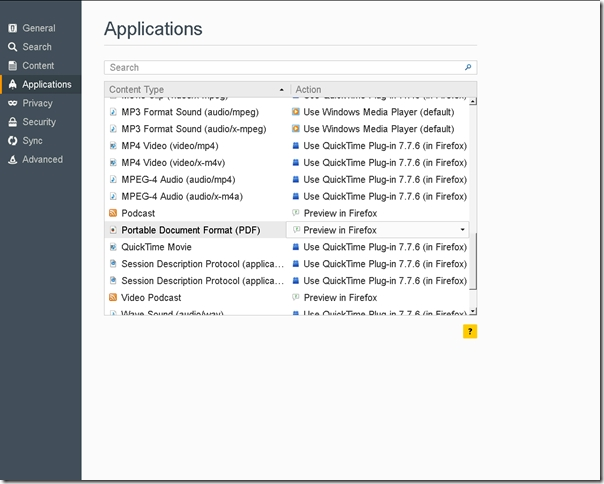
Just deleting the mimetypes.rdf file didn't fix the problem for me. I also had to go into Options --> Applications and set the application for PDFs to "Preview in Firefox". That did the trick.
Modifié le par cfcentaurea