


باز
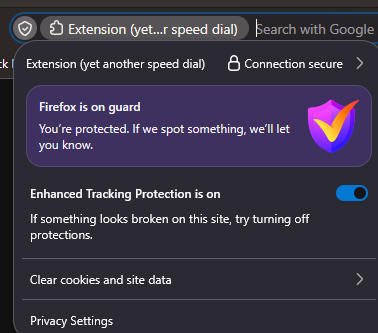
extension's name appearing in its icon takes up obnoxious amount of space in the address bar

recently swapped to firefox from chrome and found the same speed dial extension i used there was here too, yay, https://addons.mozilla.org/en-US/firefox/addon/yet-another-speed-dial/
but in the address bar there's this big, gross blob taking up a bunch of space right where i click and it pops up an even bigger, grosser blob when i click.
i dont want to disable any of what that all is doing, but i dont want to see it. how do i hide this crap?
pardon my curtness, ive been trying and failing for two three hours and unwillingly had to make an account just to ask
recently swapped to firefox from chrome and found the same speed dial extension i used there was here too, yay, https://addons.mozilla.org/en-US/firefox/addon/yet-another-speed-dial/
but in the address bar there's this big, gross blob taking up a bunch of space right where i click and it pops up an even bigger, grosser blob when i click.
i dont want to disable any of what that all is doing, but i dont want to see it. how do i hide this crap?
pardon my curtness, ive been trying and failing for two three hours and unwillingly had to make an account just to ask

پاسخها (1)
You can only remove this using userChrome.css file. Please ask https://www.reddit.com/r/FirefoxCSS/ about it.