


To change the folder in which sent emails are saved

I want to change the folder in which my sent emails are currently saved/stored in Thunderbolt App on my Android mobile. How can I do it ?
پاسخها (1)

POP3
If your account is connecting to the server using pop3, moving mails in the sent folder, or setting a different folder to store them is NOT supported by the app.
IMAP
If the account is using an IMAP connection to the server...
You can move emails in the sent folder to a different imap folder.
- Select some/all your desired mails to be moved.
- Tap the three dot menu ፧ top right in the toolbar.
- Tap move
- Select your desired IMAP folder.
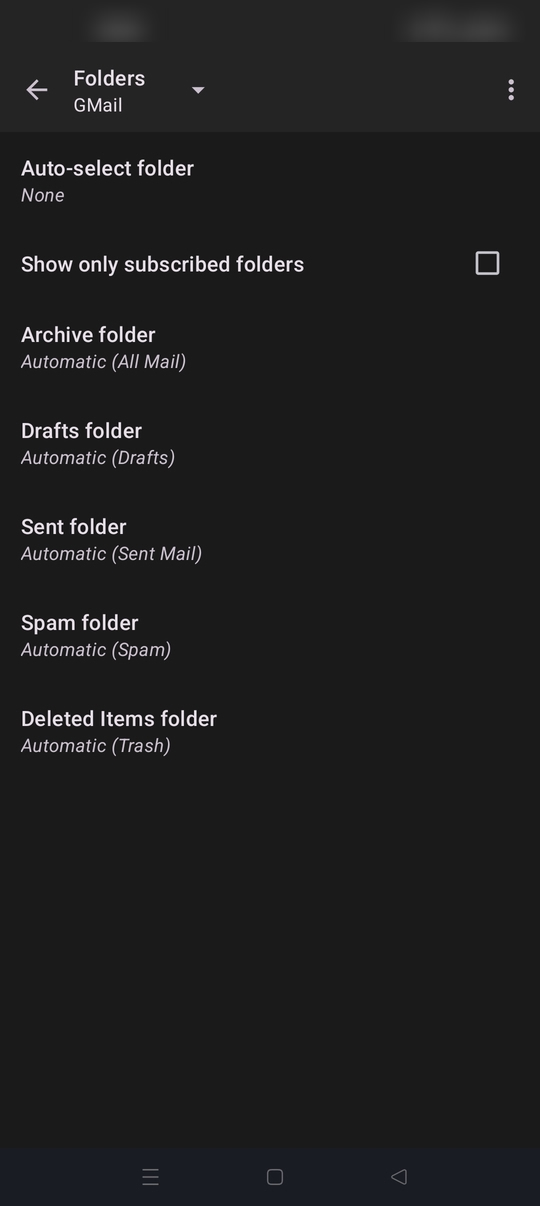
If your asking if you can associate a different Imap folder with the special "Sent folder", then yes.
- Navigate to settings > account name > folders. (see screen shot)
- Tap the sent folder and pick a different imap folder from the list.
Sent emails will then automatically be placed in your selected imap folder instead of your providers default "Sent mail" folder.
New imap folders can't be created directly in the app. You can create them using your providers web mail and they will appear in the app after you refresh the apps folder list. To do this.
- Open the side bar with your accounts folders displayed
- Tap manage folders (bottom of the list)
- Tap the three dot menu > refresh folders
ویرایش شده توسط Platform34