


help - Thunderbird Host Gator Login request? + accounts at firefox request
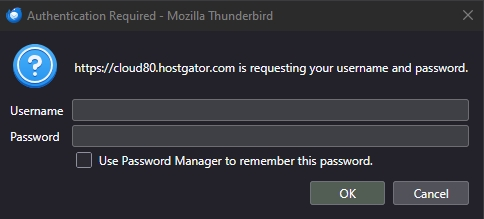
1) When launched, Thunderbird 140.13 has a pop-up window asking for a Host Gator login. HG has not been used or on this system over 8 years. "cloud80.hostgator.com is requesting your username and password." What would cause this window to appear and How to delete it completely?
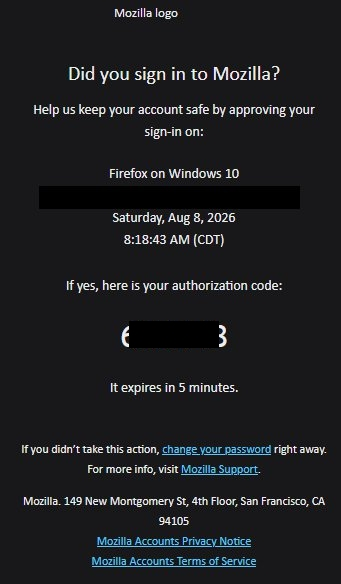
2) Also, after the Thunderbird 140.13 installed and re-launched, an email was sent requesting to verify location and login sent from: "accounts at firefox.com". Is this a common request from Mozilla firefox / thunderbird?
All Replies (2)
Hello Sadicus,
Cause The issue you are experiencing is partly caused by conflicts with legacy data and leftover server connections.
To prevent or resolve this, you can completely remove the account you recently added to Thunderbird, including its SMTP settings.
This conflict was triggered by Thunderbird's automatic account discovery feature and how it interacted with the server software.
Modified by Googlethunderbird.
Hello there
Open Settings: Right-click on your account name in the left sidebar and select Settings (or click the Gear icon at the bottom left).
To solve this issue , follow this
To open settings, right-click your account name and choose Settings. You can also click the three-line menu or gear icon.
Delete account: Look for old HostGator addresses in the list, select the account, and remove it.
Remove SMTP server: Scroll down in the account settings, click Outgoing Server (SMTP), select the HostGator server, and click Remove.
Clean up profile (optional): If the issue persists, close Thunderbird. Press Windows Key + R, type thunderbird.exe -p, and hit Enter. Create a new profile or delete old/corrupted ones here.
Old passwords, tokens, and security keys conflict with this server. These duplicates occur because newer data should already exist, confusing Thunderbird. Disconnect temporarily until fixed. Clear caches for both this and the desktop software. As stated above, remove HostGator, update credentials, and backup old HostGator data (Synced data will be erased permanently.) to a separate folder before deciding to delete it
Hopefully, these steps solved part of your issue. HostGator is removed, so you can start Thunderbird without it. I hope they don't come back, but if they do, just send us another message
After deleting those accounts, getting the new version of Thunderbird will help. Cleaning the PC with CCleaner and reinstalling your software is a good choice. After that you can use both email programs together again if you like
Use https://www.thunderbird.net/en-US/thunderbird/all/
https://support.mozilla.org/en-US/kb/installing-thunderbird-windows
Modified by Googlethunderbird.