


In Thunderbird, the "Play a Sound" feature has quit.
In Thunderbird, the "Play a Sound" feature has quit. I changed from 'Use the following sound file' to 'Default system sound for new mail' and back again. That didn't work. I tried changing the file in 'Use the following sound file'. That didn't fix it. I restarted Thunderbird and it was the same. I don't want to uninstall and re-install. Is there a fix?
All Replies (11)
BTW - I already know the audio file needs to be a .wav file. Thanks. JRW Dubois
This is not correct. You can also choose an .mp3 audio file, at least here in the macOS Thunderbird version
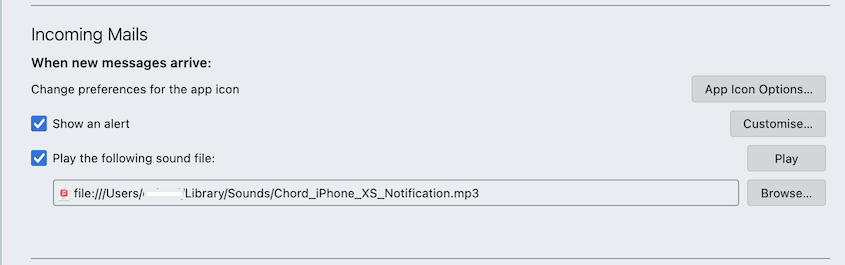

I've been playing around with this and here's what I see so far...
Windows 10 and 11, Linux Mint, Thunderbird 140.9.x: Will not play MP3 files, though you can select them. Will not play WAV files compressed with ADPCM compression, but will play WAV files in uncompressed PCM format. Older Thunderbird Windows versions used to be able to play MP3 and ADPCM files.
Ubuntu Linux will not play any notification sounds for me. That may have to do with the OS out-of-the-box not playing any audio without a bunch of codecs being installed. I gave up after a while.
All the Linux tests were in VirtualBox machines.
Modified by Lin
A bit more info - the .wav file plays fine when I used in my media player on Ubuntu. It just doesn't work within Thunderbird, but neither will the default audio for incoming emails. Thunderbird's 'play a sound' is broken. I guess that there's no other fix. I don't want to UN-install and re-install, but..........
I'm more inclined to say it's an Ubuntu problem, or some peculiar Thunderbird+Ubuntu thing, since sounds play in all other OSs that I tried. Tb has definitely gotten generally pickier about what formats it will play. It seems to not like compressed audio of any kind.
Did it used to work with earlier Thunderbirds? I tried Ubuntu 24 and 25 - same thing.
The .wav file worked fine within Thunderbird on Ubuntu for several months, then I didn't notice when it quit. I selected this .wav file months ago and it worked well until lately. I didn't change anything, not the .wav file, not my settings, not my volume. It just quit all on it's own.
Can you confirm that the WAV file is in uncompressed PCM format, not compressed with ADPCM or other?
A handy utility for examining the properties of audio/video files is MediaInfo, available for many OSs, including Ubuntu Linux.
Thanks for the link Lin, but the format doesn't seem to be the problem. The .wav files still plays fine in my Ubuntu media players now and the file also worked in Thunderbird a week ago. It worked for several weeks before.
OK, it's up to you. But I'm telling you that Thunderbird currently does not like compressed audio. That the system will play them is irrelevant.