


Windows 10 reached EOS (end of support) on October 14, 2025. For more information, see this article.

Search Support

Avoid support scams. We will never ask you to call or text a phone number or share personal information. Please report suspicious activity using the “Report Abuse” option.

Learn More

Trying to pin multiple profiles to windows taskbar

  • No replies
  • 0 have this problem
  • 19 views
more options

I recently downloaded Firefox and made two profiles on it from the hamburger button in the top right. I make one called "Work Profile" and another called "Personal Profile". I was trying to pin each one to the task bar separately because I would use youtube to watch videos/listen to music on one window and do my work in another. I have enabled the group profiles on taskbar so they dont show up together under the same icon and added { -no-remote -P "Profile Name"} to each shortcut in its properties>target on windows explorer.

It just keeps bringing up the choose user profile window but it doesn't even have the two profiles listed that I want.

When I open default then all my profiles are gone in the top right profiles window but if I choose default-release my profiles are there to select again. I am pretty sure firefox just has two things it calls profiles, one is for multiple installs and the other in in each install and I don't know how to fix it now as all my settings/passwords/add-ons are setup and I would like to not have to do it again.
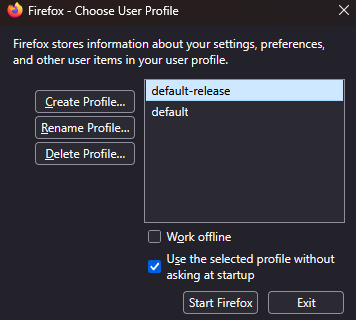
I recently downloaded Firefox and made two profiles on it from the hamburger button in the top right. I make one called "Work Profile" and another called "Personal Profile". I was trying to pin each one to the task bar separately because I would use youtube to watch videos/listen to music on one window and do my work in another. I have enabled the group profiles on taskbar so they dont show up together under the same icon and added { -no-remote -P "Profile Name"} to each shortcut in its properties>target on windows explorer. It just keeps bringing up the choose user profile window but it doesn't even have the two profiles listed that I want. When I open default then all my profiles are gone in the top right profiles window but if I choose default-release my profiles are there to select again. I am pretty sure firefox just has two things it calls profiles, one is for multiple installs and the other in in each install and I don't know how to fix it now as all my settings/passwords/add-ons are setup and I would like to not have to do it again.
Attached screenshots

You must log in to your account to reply to posts. Please start a new question, if you do not have an account yet.