


HOW DO I STOP sound notifications

HOW DO I STOP sound notifications
بخشها
Gerald Anderson said
Sorry David the attached page didn't come thru. It bugs me when I am on a live zoom and the chime rings again and again
Then look at it on the web site. if you can not see the image in the email you received.
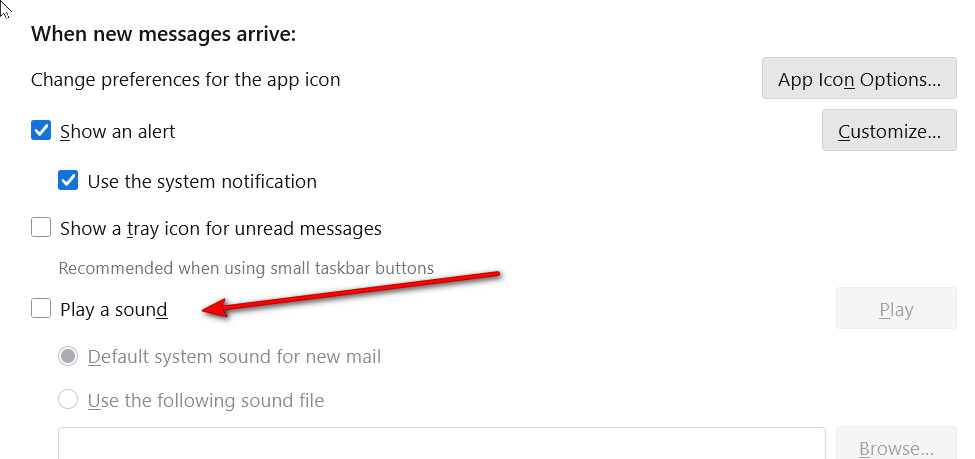 I have included the image again. Just so you do not have to access it from the support web site.
پاسخها (9)
In settings>general, you should be able to stop notifications of new email.
NO place to stop this awful noise in the middle of the night
It seems you have system notifications turned on in TB Settings. Disable them, or disable sound notifications for TB in Windows Settings.
what is TB?
TB = ThunderBird
Sorry David NO PLACE is it turn on or a place to turn OFF
Sorry, I was thinking of this option in settings>general - see attached.
Sorry David the attached page didn't come thru. It bugs me when I am on a live zoom and the chime rings again and again
بخشها
Gerald Anderson said
Sorry David the attached page didn't come thru. It bugs me when I am on a live zoom and the chime rings again and again
Then look at it on the web site. if you can not see the image in the email you received.
I have included the image again. Just so you do not have to access it from the support web site.