


McAfee Webadvisor Popup on Desktop when McAfee not installed

I uninstalled McAfee on my new Windows 11 computer but am getting a popup screen on the desktop for McAfee webadvisor. There are no McAfee apps on the computer so I assume there must be a place in Mozilla that has this alert turned on. How do I get rid of it?

پاسخها (1)

Any extensions? Is the pop up coming from the bottom right hand of your screen above the time or when you're in the browser? You should run the below apps to see what is set to run when you login.
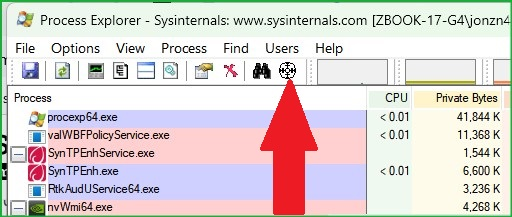
https://learn.microsoft.com/en-us/sysinternals/downloads/autoruns https://learn.microsoft.com/en-us/sysinternals/downloads/process-explorer With process explorer, you can use the bullseye option from the menu to click on the McAfee pop up and it will show the process running it. I LOVE THIS TOOL
ویرایش شده توسط jonzn4SUSE