


Since loading Thunderbird 60, I cannot send email; receive is fine, but sending I get error message that transmission failed.
I can receive mail fine, but I cannot send. I have verified with my ISP the smtp settings and re-installed Thunderbird. But it still fails with:
Sending of the message failed. The message could not be sent because the connection to Outgoing server (SMTP) smtp.redshift.com was lost in the middle of the transaction. Try again.
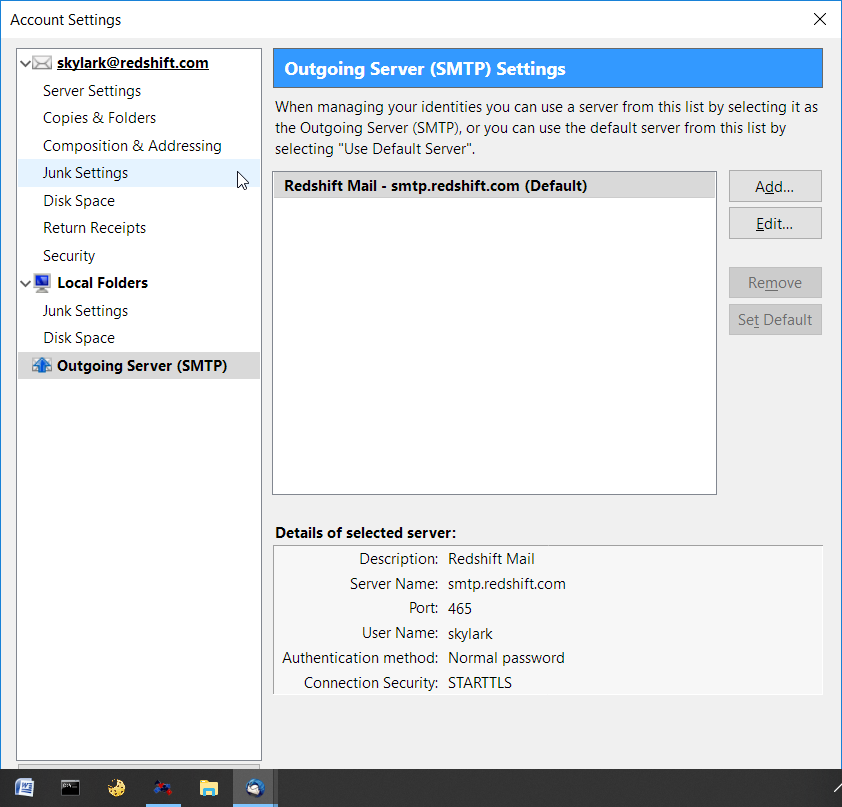
Nothing has changed besides the new vsn of Thunderbird. I have included a screen shot of the smtp settings.
Thanks for any insight.
All Replies (2)
Turns out my ISP has supplied me with the correct port number and protocol, but somehow in the re installation I had saved an incorrect password for the smtp server. So minor surgery for shooting myself in the foot and thanks for your input.

I have a similar problem. It seems that Thunderbird automatically reverts all settings in the Send-Mail pane to their standards with every major new release of the app. Very annoying!