


No text in tooltip (mouse hover)

For several days instead of text I see only a blank tooltip The problem concerns content on Websites (No. 2) as well as the interface itself (No. 1). Firefox update did not help. Running in safe mode does not fix anything. In other programs, the tooltip works fine. Any help? I will be grateful [Maybe the text color has somehow changed to white and therefore can not be seen?]
ویرایش شده توسط najphil
پاسخها (3)
Upload screenshot disappeared so I will add here again
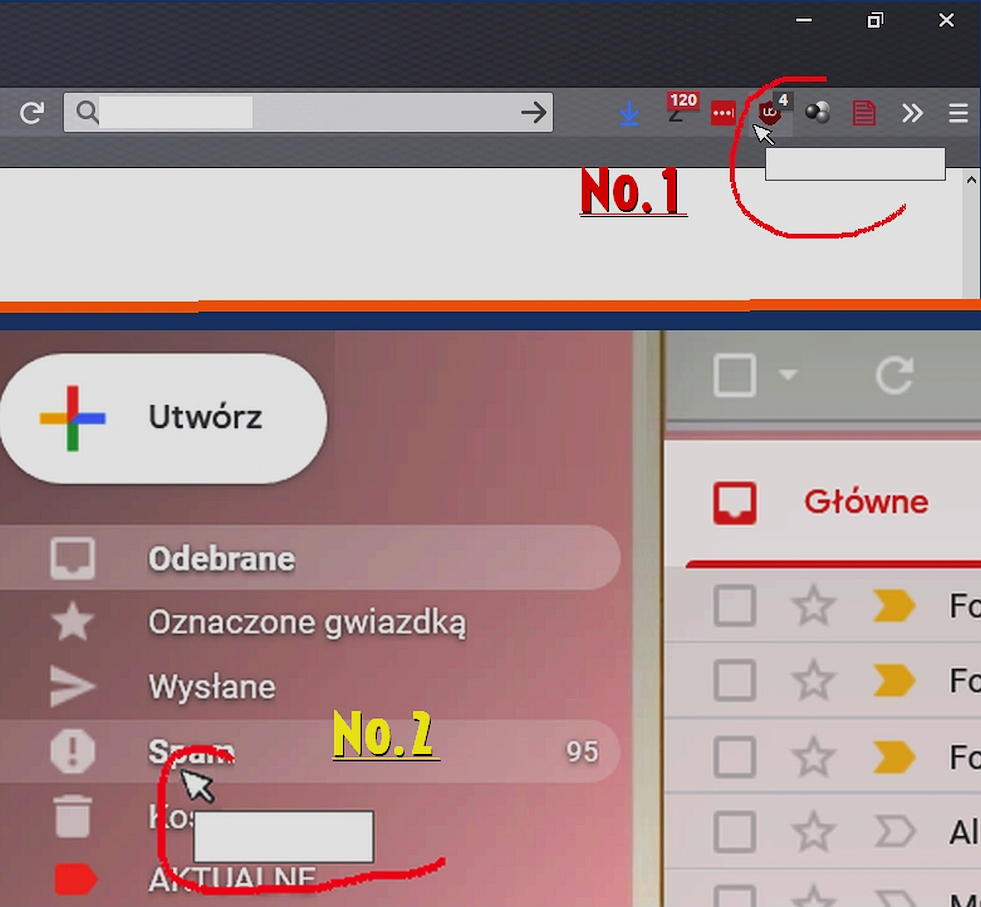
ویرایش شده توسط najphil
بخشها
I don't know whether it's relevant, but if you change from your current theme to one of the built-in themes -- Default, Light, Dark -- does that make any difference?
Your Safe Mode test should rule out a problem with extensions, "hardware acceleration." or a userChrome.css file or userContent.css file.
On older versions of Windows, there was a dialog to specify in detail each color throughout the Windows Explorer UI and Firefox would follow some of that. However, if you aren't noticing white text in tooltips in Windows Explorer, that's probably not the source of it.
Thx bro. Changing the Windows theme has fixed the problem