


Firefox icon shows in task bar, but will not open the page

Dell XPS 8900 Windows 10 Pro version 1703 Processor Intel (R) core (TM) i7-6700 CPU @ 3.4 GHz 3.41 GHz Ram 16.0 GB 64 bit OS x64-based processor
Firefox will not open from the icon in the task bar. When the cursor scrolls over the icon, the small window shows my home page but will not open it. I have uninstalled FF several times and reinstalled it without success. I just went through uninstalling again and downloading the newest FF version, but it still will not open from the task bar or through file explorer.
All Replies (9)
hi, can you try to click on the windows preview like you would to get firefox into the foreground and press windows-key+left/right-arrow a couple of times to see if this can get firefox into view?
Unfortunately, this does not work.
can you right click the preview and click restore/maximize?
Windows 10 does not have that option in preview. It has an option to pin to task bar, Close, it has the Moxilla Firefox icon and also has an option to open a new page, but not to restore/maximize.
i'm also on win10 and i have those options when right-clicking in the preview panel... (screenshot in german though)
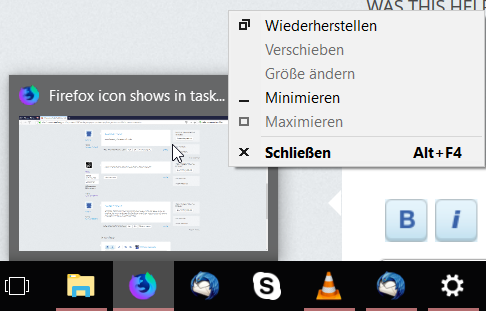
Yours looks different. My print screen isn't working, but I did fine a trouble shooter. I'll run that.
Nope. Nothing here.
All this just happened after the latest update
No, but I haven't tried the speaker yet to see if the update helps.