


Firefox crashes

When i go to my Gmail account it won't let me and it comes up Firefox crashed and send report to them so i did that and it didn't work and i tried downloading something but that didn't work either. I can't get to my Gmail account.
پاسخها (2)

Donna61 said
I can't get to my Gmail account.
What happens when you try?
Many site issues can be caused by corrupt cookies or cache.
- Clear the Cache and
- Remove Cookies
Warning ! ! This will log you out of sites you're logged in to. You may also lose any settings for that website.
Type about:preferences<enter> in the address bar.
- Cookies; Select Privacy. Under History, select
Firefox will Use Custom Settings. Press the button on the right side called Show Cookies. Use the search bar to look for the site. Note; There may be more than one entry. Remove All of them.
- Cache; Select Advanced > Network. Across from
Cached Web Content, Press Clear Now.
If there is still a problem, Start Firefox in Safe Mode {web link} A small dialog should appear. Click Start In Safe Mode (not Refresh). While you are in safe mode;
Type about:preferences#advanced<enter> in the address bar.
Under Advanced, Select General. Look for and turn off Use Hardware Acceleration.
Then restart. Poke around safe websites. Are there any problems?
Donna61 said
Firefox crashed
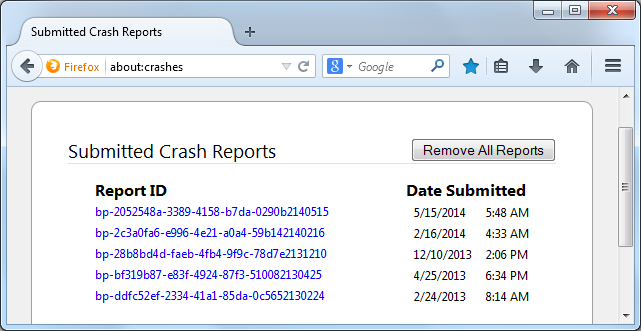
In the address bar, type about:crashes<enter>. Note: If any reports do not have BP- in front of the numbers/letters, click it to submit them.
The crash report is several pages of data. We need the report numbers to see the whole report.
Using your mouse, mark the most recent 7 - 10 crash reports, and copy them. Press the Reply button. Now go to the reply box and paste them in.
For more help on crash reports, see; https://support.mozilla.org/en-US/kb/firefox-crashes-asking-support