


Different email accounts got mixed up. I need to fix this.

I'm currently using 4 email accounts in Thunderbird. It has been working OK since I switched to this programme from Apple Mail as I had a problem with configuration in Apple Mail. But it started sending messages from the account that I didn't choose to send from. For example, if I send an email via work@email.com, it will be received as it was sent from personal@gmail.com. The sent message stays in work@email.com's sent box and I have clearly stated that I want to send it from work@email.com but the recipient will receive it from personal@gmail.com. I've looked up Tools/Account Settings, but I don't see anything that causes this problem. (After all, it has been fine until very recently). I need to fix this. But how? What should I do?
پاسخها (1)
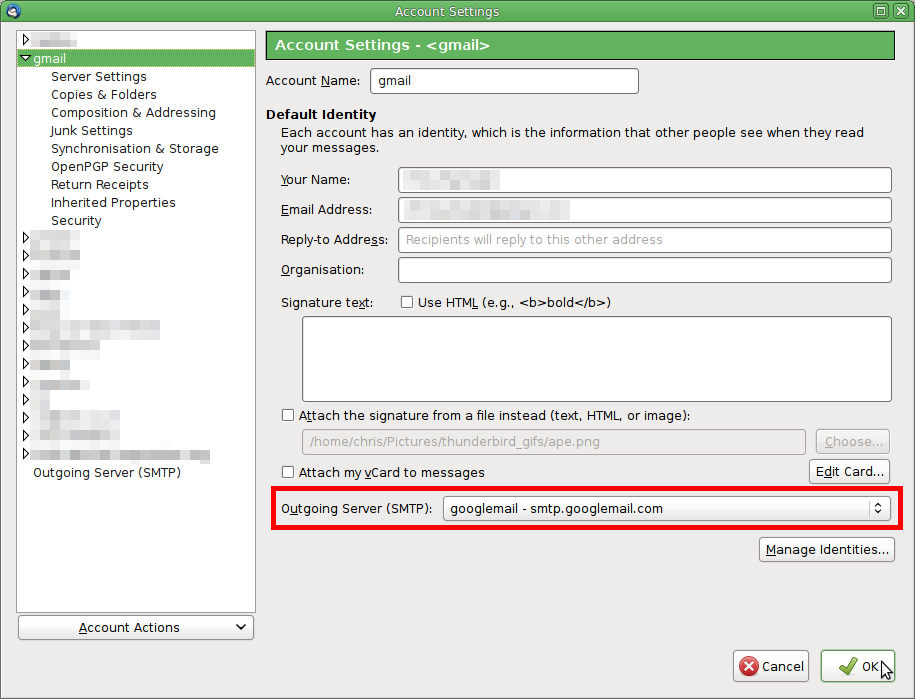
Check the SMTP server selected in the work@email.com account. It's behaving as if this has switched to a gmail smtp server. The picture shows the location of the setting and in my example it is a gmail account and is properly using a gmail smtp server. But I am curious as to what server appears in your work@email.com account's settings.
Do you have any notion as to what event or change might have triggered this? A Thunderbird update perhaps?
ویرایش شده توسط Zenos