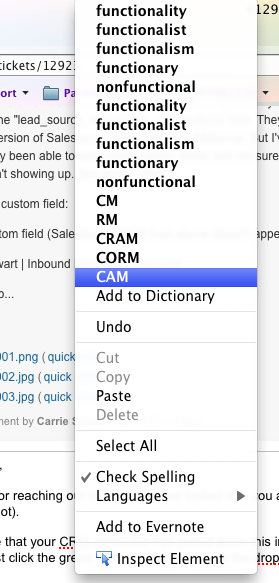
Firefox Dictionary options for "functionality" showing on every right-click action.

When i right-click on a link (including a misspelled word link), I get the standard right-click menu, plus a listing of different auto-correct options for "functionaility." I have a screenshot of what I'm seeing. Using Firefox 5.0.1 on Mac OS X 10.6.8
All Replies (5)
Is this comment asking me to take a screenshot, or instructing me how to take a screenshot? No longer at my work computer where this issue is happening; I'll be able to post my screenshot when I'm back at the office.
Original problem persists: when I right-click, I have dictionary suggestions for the same misspelled word, regardless of where I right-click.
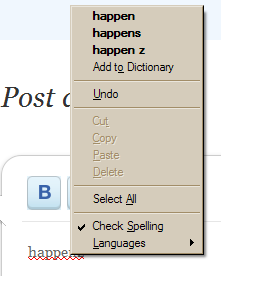
Look at the image below for what you should see. This example is with no extensions installed. Your menu may be different, with additional items if add-ons included them.
If this reply solves your problem, please click "Solved It" next to this reply when signed-in to the forum.
Not related to your question, but...
You need to update some plug-ins:
- Plug-in check: https://www-trunk.stage.mozilla.com/en-US/plugincheck/
- Shockwave Flash (Adobe Flash or Flash): Updating Flash in Firefox
This issue can be caused by an extension that isn't working properly.
Start Firefox in Use Troubleshoot Mode in Firefox to check if one of the extensions is causing the problem (switch to the DEFAULT theme: Firefox (Tools) > Add-ons > Appearance/Themes).
- Don't make any changes on the Safe mode start window.
- https://support.mozilla.com/kb/Safe+Mode
Thanks for all your suggestions to help! Unfortunately, everything seemed to be working just fine once I had restarted my computer upon returning to work. Sorry to have missed this basic troubleshooting step!
Attached is the screenshot of the original problem I saw, for future reference.